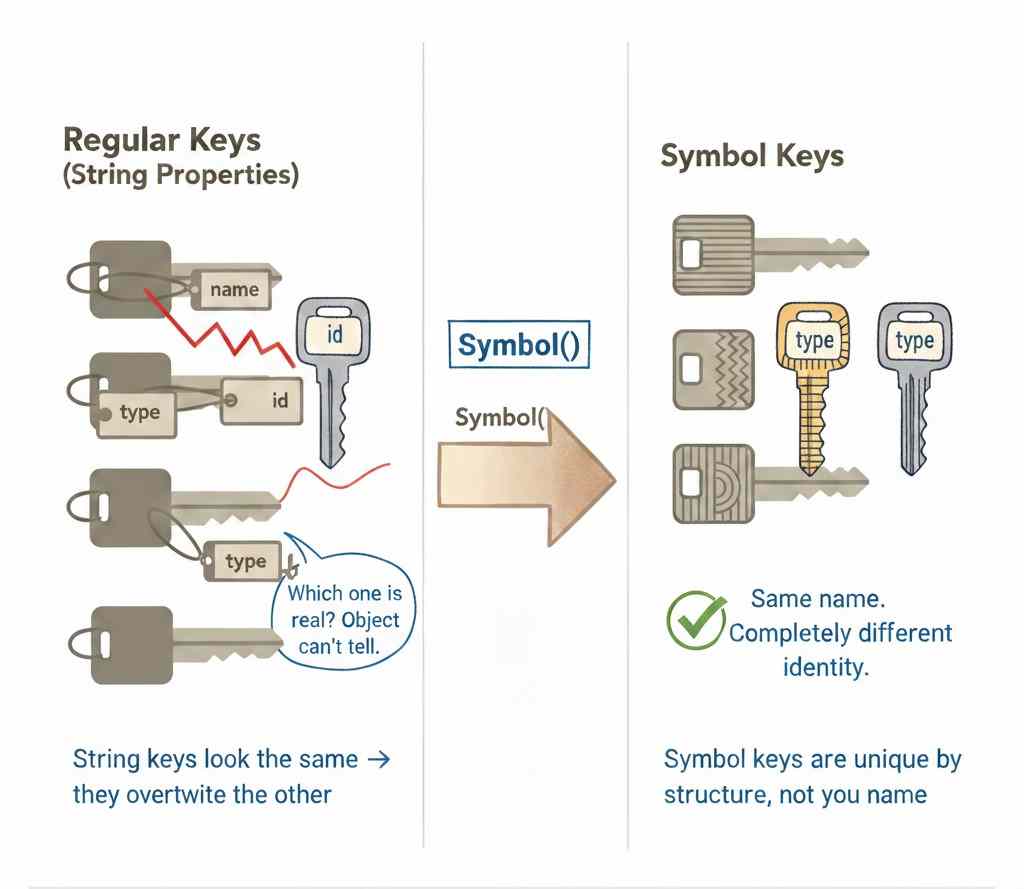

JavaScript Symbol explained refers to a primitive type used to create unique identifiers within the language’s object model.
It exists alongside strings and numbers as a way to represent keys that are guaranteed not to collide.
In larger codebases and shared environments, objects often accumulate properties from frameworks, utilities, and user logic at the same time.
Without a collision-safe key mechanism, extending behavior can silently overwrite data or interfere with internal mechanics.
This page walks through the role Symbols play in JavaScript’s type system, how they fit into object architecture, and where they appear across language features and platform conventions.
What You’ll Learn in This JavaScript Symbol Explained Guide
- Identify appropriate use cases for Symbol keys
- Distinguish local versus global Symbol strategies
- Understand Symbol impact on object architecture
- Evaluate privacy and visibility tradeoffs
- Apply Symbols in multi-module environments
Who This JavaScript Symbol Explained Guide Is For
Intermediate JavaScript developers working with shared objects or libraries. Useful for engineers designing maintainable application architecture.
When to read this section
Read this when property naming strategies start breaking down in multi-module or library-integrated code. It’s also the right time to dive in if you want to explore how Symbols work internally—this section is built as a JavaScript Symbol explained guide, giving you a clear, in-depth understanding of its core mechanics.
How to Approach Learning JavaScript Symbols
JavaScript Symbols are not learned linearly. Different developers encounter them for different reasons — naming conflicts, understanding the Symbol mechanism, deciding why to use Symbols, exploring real use cases, or learning best practices.
Use the paths below to move directly toward the part of the system you are trying to understand.
This pillar guide is built around five advanced JavaScript Symbol topics, organized in a clear, step-by-step way to help you understand each concept more easily.
Explore the sections below to build a complete understanding of how JavaScript Symbols work.
Understanding Collision-Safe Object Metadata
JavaScript objects originally expose a single shared property namespace, so any module attaching information competes for the same identifiers. As ecosystems grew, objects began carrying both business data and internal coordination details, creating accidental overwrites that look valid to the runtime. Symbols introduce a second category of property identity designed for metadata rather than user-facing state. This clarifies that not every property is meant to participate in normal object interaction, iteration, or naming conventions. The concept removes the mistaken assumption that careful naming alone can guarantee isolation inside shared objects.
→ Why JavaScript Introduced Symbols Instead of Better Naming Conventions
How JavaScript Symbol Explained Internally
The JavaScript Symbol data type is a unique, immutable primitive designed to create collision-free object keys in modern JavaScript applications. Unlike strings, each Symbol is guaranteed to be unique, making it essential for preventing property name conflicts in large codebases or third-party integrations.
By using Symbols, developers can keep internal properties hidden, secure, and isolated from accidental overwrites or standard object iteration. The built-in global registry (Symbol.for) also allows controlled sharing of identifiers across different parts of an application.
Because Symbol works as a lightweight factory function—not a constructor—it ensures better performance and predictable behavior. Overall, the JavaScript Symbol data type is a critical tool for building scalable, maintainable, and conflict-free systems.
See how Symbol identity is preserved during runtime and why it behaves differently from ordinary primitives.
→ JavaScript Symbol data type: How It Works and deep Internals
Choosing Symbols as an Abstraction
Most developers use JavaScript for years without fully understanding what Symbols actually unlock. This JavaScript Symbol explained guide bridges that gap. You’ll see exactly why use symbol in javascript, how they prevent naming collisions, and how they enable true data hiding inside objects. From controlling iteration with Symbol.iterator to customizing type conversion using Symbol.toPrimitive, this isn’t just syntax—it’s direct interaction with JavaScript’s internal behavior. These patterns go beyond basics and shape how scalable, reliable code is written. If your objects have ever clashed, leaked, or behaved unexpectedly, this is where things start to make sense.
Now the real depth begins—explore the full breakdown in here-
→ Why Use Symbol in JavaScript: Master Advanced Dev Patterns.
JavaScript Symbol Explained in Real Software
JavaScript Symbol use cases don’t show up in most tutorials — and that’s exactly why most developers never think twice about them. You learn the basics, maybe even BigInt, and Symbol just sits there looking optional. Easy to skip.
But skip it, and you miss something genuinely interesting.
Get Tareq's engineering logs in your inbox
Join CodeDeed for free for the latest in dev and AI automation.
Two real problems that show up in production code — configuration systems where modules silently overwrite each other’s keys, and XSS attacks that sneak past input sanitization entirely. Senior engineers reach for Symbol in both situations, and there’s a very specific reason why.
Here’s what makes it click: every Symbol is completely unique, and it disappears the moment it hits JSON serialization. That’s not a quirk — that’s a feature. Facebook’s React team figured this out in 2015, and the same pattern now quietly protects billions of API requests daily across Instagram, Netflix, and Airbnb.
This is JavaScript Symbol explained through two use cases that actually matter in the real world — not toy examples, not contrived demos. Real patterns, running in real production systems, solving real problems that string-based solutions simply cannot.
If you’ve ever wondered why React skips string markers, or why plain-key configuration feels subtly fragile — this is where you get the answer.
→ JavaScript Symbol Use Cases: 2 powerful Production Gems
Production-Level Symbol Insights
JavaScript symbol best practices are one of those topics that seem simple on the surface — until a production bug proves otherwise. Symbols offer guaranteed uniqueness, lightweight property isolation, and a clean way to build enum-like structures without risking naming collisions. But misuse them, and you’re looking at silent memory leaks, confusing debug sessions, and a false sense of security around data privacy.
This guide cuts through the noise. You’ll learn why Symbols aren’t a replacement for true privacy mechanisms like private class fields or WeakMap — and why that distinction matters more than most tutorials admit. You’ll see exactly when to reach for Symbol() versus Symbol.for(), how to build collision-free enums that actually hold up in large-scale apps, and why skipping a description when creating a Symbol is the kind of small habit that costs you hours at midnight.
With JavaScript symbol explained from both beginner and advanced perspectives, this article gives you the mental model most developers are missing — the one that separates developers who use Symbols correctly from those who just use them confidently.
Whether you’re building a library, scaling an enterprise app, or just tired of subtle property conflicts, understanding Symbols at this level changes how you write JavaScript — for good.
Round Up
JavaScript Symbol explained stops being a conversation about a primitive type once you’ve worked on real systems. At that point, it becomes obvious that Symbol is a structural safeguard inside JavaScript’s object architecture. Shared property namespaces introduce quiet, hard-to-detect risks. Symbols remove that entire category of failure by providing collision-safe metadata whose uniqueness is enforced by the runtime — not by naming conventions or team discipline. That move from “be careful with names” to guaranteed identity fundamentally changes how we design objects.
Used intentionally, Symbols communicate architectural intent. They make it clear that a property exists to support internal mechanics, not to expose public state. In larger codebases, that separation protects maintainability, reduces accidental overrides, and keeps abstractions from becoming fragile over time. From this perspective, JavaScript Symbol explained isn’t about syntax — it’s about enforcing boundaries that keep shared systems stable.
The real production insight, though, is restraint. Symbols are most effective when applied where isolation is required, not where uniqueness simply feels interesting. Overuse adds noise; precision adds clarity.
For those who want to understand the guarantees at the language level, the ECMAScript specification’s section on Symbol objects defines the runtime semantics that make collision safety and uniqueness reliable — not optional.