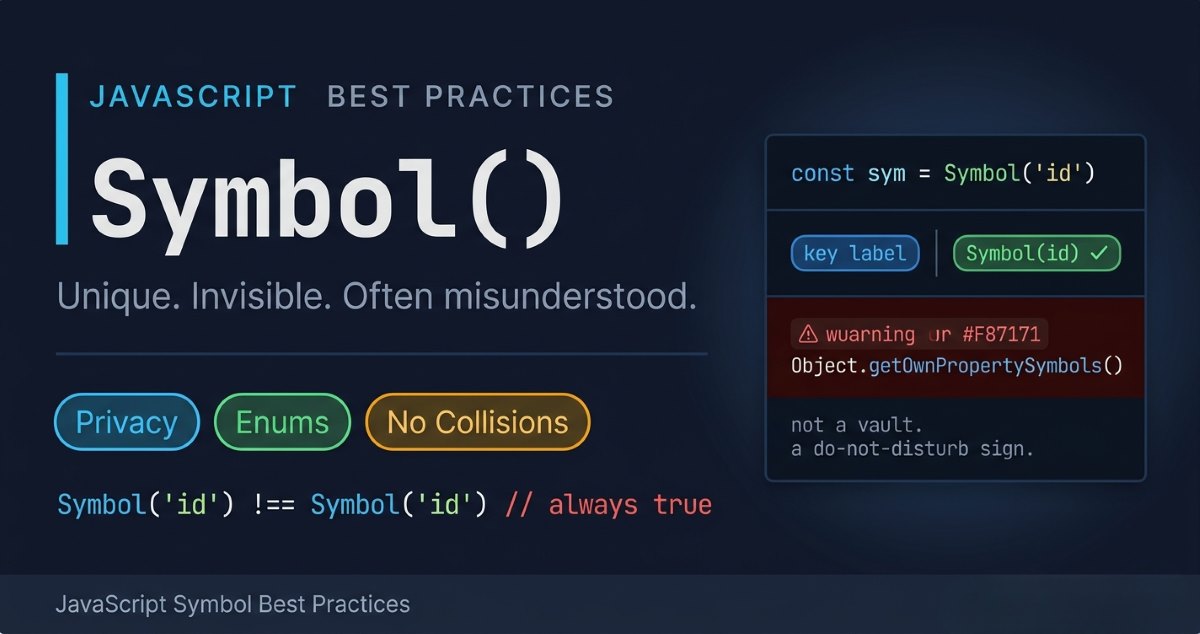

JavaScript symbol best practices usually don’t cross your mind until something quietly breaks in your codebase. You add a property to avoid collisions, everything looks fine — and then suddenly, some internal logic or a third-party integration starts behaving unpredictably. You stop and think, “Wait… wasn’t Symbol supposed to handle this?”
That confusion is more common than most developers admit. Symbol is powerful, but without the right mental model, it’s easy to misuse — especially in complex systems like APIs, libraries, or large-scale applications.
Having worked with production-grade JavaScript systems and debugged real-world Symbol-related issues firsthand, I’ve seen how small misunderstandings can snowball into subtle, hard-to-trace bugs.
In this article, you won’t just learn the correct patterns — you’ll understand the reasoning behind them, so you can write cleaner, safer, and more predictable code. Let’s get into it.
JavaScript Symbol Best Practices for Usage
Let’s walk through the JavaScript Symbol best practices every developer should know when working with Symbols. Get these right, and you’ll handle symbol usage in real-world projects with a lot more confidence.
Using Symbols for Data Privacy
Look, I’ll be straight with you — JavaScript Symbols can help with data privacy, but they’re not a silver bullet. Let me break down what they actually do and where they genuinely fit in.
What Symbols Actually Provide
Symbols give you a way to hide object properties from casual access. They’re great for preventing accidental overwrites or unintended property lookups. Think of them as a “soft” privacy layer — they make things harder to reach, but they don’t lock the door completely.
Here’s a simple example:
js
const user = {

name: "Sofia",

[Symbol('password')]: "secret12345",

};
That password property is now hidden from normal enumeration — but here’s the catch: Symbols don’t provide true privacy. Anyone determined enough can still access Symbol properties using Object.getOwnPropertySymbols(). It’s obscurity, not security. That’s the real symbol meaning developers often miss early on.

Where Developers Go Wrong
I made this exact mistake while building a multi-tenant SaaS dashboard. I was wrapping session data in a symbol variable, genuinely thinking that meant it was private. Then, while integrating a third-party analytics library, I noticed it was reading my “hidden” properties using Object.getOwnPropertySymbols().
That was the moment it clicked — Symbol is a “do not disturb” sign, not a vault lock. After that, I moved sensitive data to WeakMap and kept Symbols strictly for property collision prevention. Keeping that boundary clear saves you from a lot of security misconceptions down the road.
Better Options for True Privacy
When using a WeakMap, data cannot be accessed through Object.getOwnPropertySymbols() like it can with Symbols. That’s why WeakMap is significantly more secure and reliable for handling sensitive data.
Depending on what you need, here are stronger alternatives:
- Closures — My go-to for function-scoped privacy. Super powerful in functional programming.
- Private class fields (#field) — True privacy in modern JavaScript classes.
- WeakMap — Great for associating private data with objects without exposing it.
- TypeScript’s private modifier — Compile-time safety. Especially relevant if you work with symbol data type in TypeScript.
- Proxies — Fine-grained control over how object properties are accessed.
That said, Symbols still earn their place. For lightweight projects where you just need to avoid naming collisions or hide non-critical properties, they’re a solid, low-overhead choice.
Are Symbols Just for Beginners?
Not even close. I’ve worked on enterprise codebases where Symbols are used extensively — especially in library and framework internals. They’re a fundamental part of modern JavaScript and show up constantly in advanced use cases. Don’t sleep on them.
JavaScript Symbol Best Practice: Always Add a Description
Here’s a mistake I see constantly — creating Symbols without a proper description of symbols:
js
// Don't do this

let sym = Symbol();

// Do this instead

let sym = Symbol("user ID");

let sym2 = Symbol("session token");
The description doesn’t change how to use symbol in javascript, but it makes debugging dramatically easier. When you’re staring at console output trying to figure out which Symbol belongs where, you’ll be glad you added those labels.
I learned this lesson at the worst possible time — 11 PM, the night after a production deployment. I was chasing a bug and kept seeing Symbol(), Symbol(), Symbol() in the console with zero context. Three Symbols, all without descriptions, all looking identical. I burned about two hours on that debug session just because of missing strings.
Since then, it’s been a hard rule for me: always write a description when creating a Symbol — same discipline as writing a comment for a function. It’s a small habit, but it pays off big in production.
Using JavaScript Symbols to Build Clean Enums
Symbols are genuinely great for building enums — and this is one of the more underrated symbol use cases in everyday development. JavaScript doesn’t give us enums natively, but we can build our own — and Symbols make it surprisingly clean. I’ve used this with js symbol enum patterns across plenty of projects, and it’s become one of my go-to approaches.
You can use Object.freeze() for basic enums, and honestly, it works fine for simple cases:
js
const Directions = Object.freeze({

UP: 'Up',

DOWN: 'Down',

LEFT: 'Left',

RIGHT: 'Right'

});
But here’s the problem — string values aren’t truly unique. If ‘Up’ gets used somewhere else in your codebase by accident, you’ve got a collision waiting to happen. This is a big part of why use symbol in javascript over plain strings for internal constants.
This is where Symbols shine:
js
const Colors = {

RED: Symbol('Red'),

GREEN: Symbol('Green'),

BLUE: Symbol('Blue')

};
Two reasons this is better:
- Guaranteed uniqueness — Every Symbol is completely unique, even if two share the same description. Symbol(‘Red’) !== Symbol(‘Red’) is always true. That’s what makes it a perfect symbol for unique values.
- Immutability — Symbols are primitive values, so they can’t be modified. Your enum values are locked down by design.
That combination makes Symbols a rock-solid choice for enum-like structures in JavaScript.
That said — Symbols aren’t the right tool for every scenario. They fall apart when you need to:
- Serialize to JSON for API payloads
- Store values in localStorage
- Display labels directly in the UI
- Debug quickly (Symbol values don’t show up cleanly in logs)
For those cases, frozen objects with string values are the better call. But for internal constants where you need airtight uniqueness? Symbols are hard to beat.
When Not to Use Symbol
Don’t reach for Symbols by default. I’ve seen this mistake plenty of times — especially from developers who just learned about Symbols and want to use them everywhere. Here’s the honest take: if a plain string or number gets the job done, use that.
Before adding a Symbol to your code, ask yourself: “Do I actually need guaranteed uniqueness here?” If the answer is no, you’re just making your code harder to read and debug for no real gain.
The debugging problem is real. Unlike strings, Js Symbols don’t show up cleanly in console logs or debuggers. When you’re chasing a bug at 2am, you’ll regret using Symbols where they weren’t needed.
Here’s a concrete example:
js
// Hard to debug

const config = {

[Symbol('apiKey')]: 'abc123'

};

console.log(config); // { Symbol(apiKey): 'abc123' } - not great
js
// Easy to debug

const config = {

apiKey: 'abc123'

};
console.log(config); // { apiKey: 'abc123' } - clear and simple
When Symbols Actually Make Sense
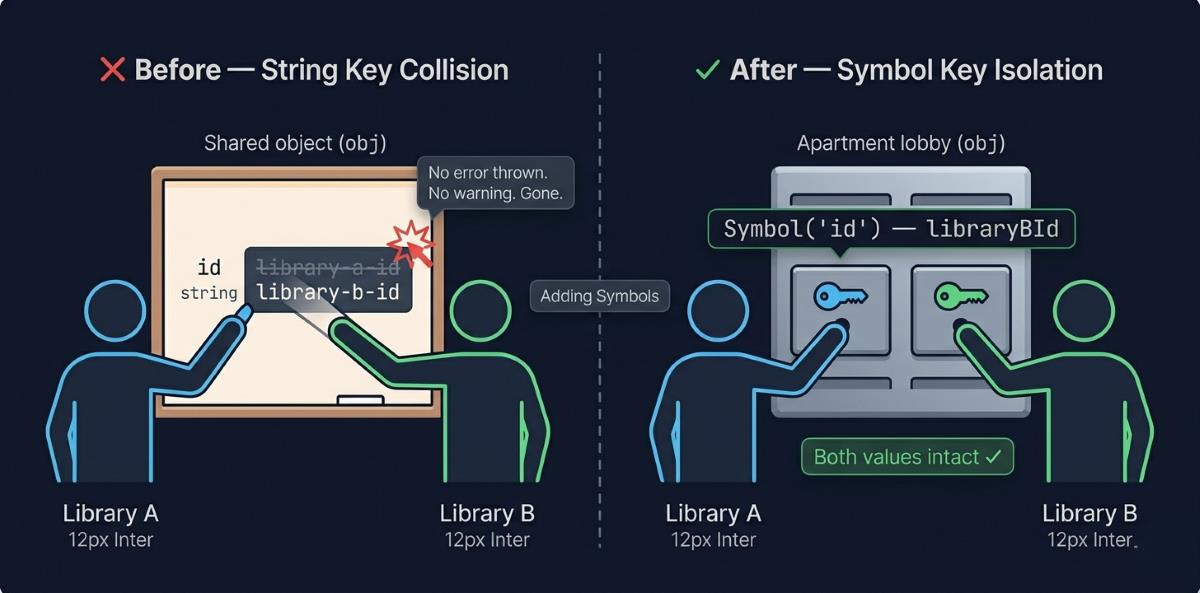
The real power of Symbols is isolation — and this gets at the heart of what are javascript symbols used for in serious codebases.
Say you’re building a large app that pulls in multiple third-party libraries. Each library might add properties to shared objects. Without Symbols, you’ve got a real naming collision risk:
js
// Library A adds a property

obj.id = 'library-a-id';

// Library B overwrites it accidentally

obj.id = 'library-b-id'; // Whoops!
With Symbols, each library gets truly isolated properties — this is exactly how to use symbol in object in js the right way:
js
// Library A

const libraryAId = Symbol('id');

obj[libraryAId] = 'library-a-id';

// Library B

const libraryBId = Symbol('id');

obj[libraryBId] = 'library-b-id';

// Both coexist safely — no collision
That’s where Symbols genuinely excel: keeping your code conflict-free in large-scale, multi-library environments.
Get Tareq's engineering logs in your inbox
Join CodeDeed for free for the latest in dev and AI automation.
Watch Out for Memory Issues
If you’re leaning heavily on Symbol.for, know that those Symbols live in a javascript global symbol registry that never gets cleaned up. In an enterprise app, careless use can cause that registry to silently grow:
Don’t do this in a loop or frequently-called function
js
for (let i = 0; i < 10000; i++) {

Symbol.for(`item-${i}`); // These all stay in memory forever

}
Use Symbol.for() only when you genuinely need to share a Symbol across different parts of your app. And always keep javascript symbol performance in mind before dropping it inside frequently-called functions.
Bottom line — reach for Symbols when you need:
- Unique, collision-free values (like for enums)
- Property isolation (preventing naming conflicts in shared objects)
- Hidden properties that won’t show up in Object.keys() or for…in loops
For everything else? Stick with strings and numbers. Your future self — and your teammates — will thank you.
Common Mistakes and Pitfalls of Symbol in JavaScript
Even experienced developers slip up with Symbols. Some of these mistakes look harmless at first glance, but they’ll come back to bite you in a job interview or a code review. Let’s go through the ones worth knowing.
JavaScript Cannot Convert a Symbol Value to a String
One of the most common early mistakes is trying to concatenate a Symbol directly with a string — and it’s a classic pitfall with the Symbol data type:
const sym = Symbol(‘Sofia’);
console.log(“Hello ” + sym);
// TypeError: Cannot convert a Symbol value to a string
The fix is straightforward — javascript symbol to string conversion always needs .toString() explicitly:
const sym = Symbol(‘Sofia’);
console.log(“Hello ” + sym.toString());
// Output: Hello Symbol(Sofia)
Takeaway: Never concatenate Symbols with strings directly. Always call .toString() or use the description via template literals.
Symbol.toString vs Implicit Conversion
Skipping the description when you create a Symbol is another mistake that bites people during debugging. Without it, all your Symbols look identical in output:
js
const sym = Symbol();

console.log(sym.toString());

// Output: Symbol()
Add a description and it’s immediately clearer:
js
const sym = Symbol('identifier');

console.log(sym.toString());

// Output: Symbol(identifier)
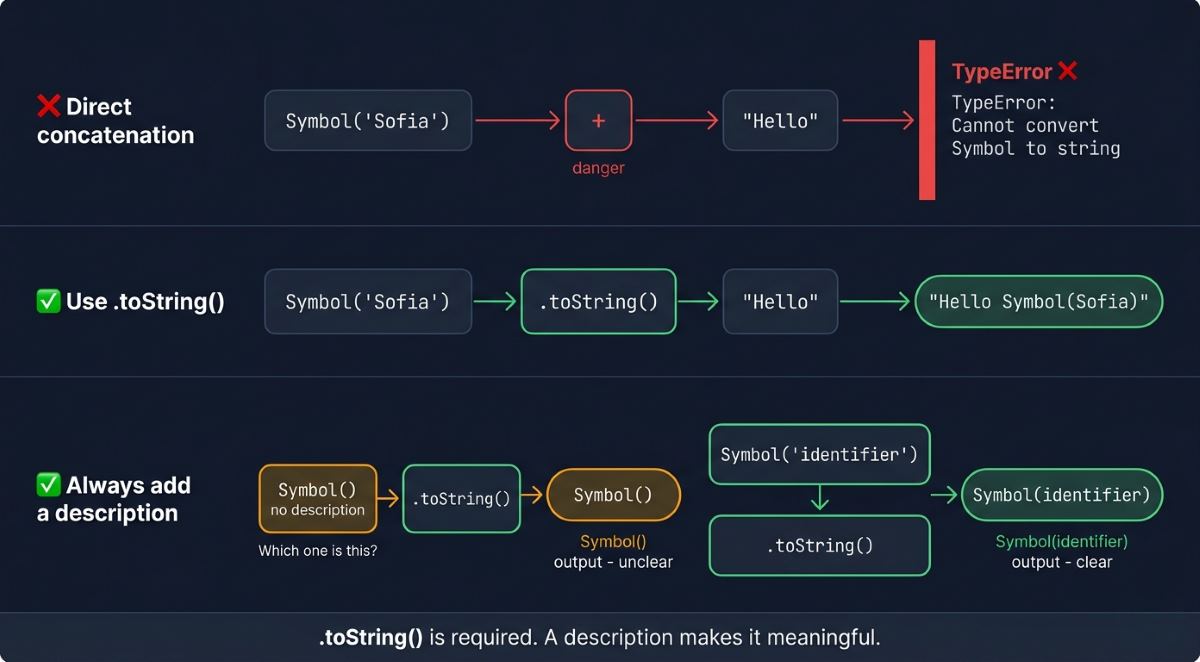
Takeaway: Always add a description. It doesn’t change the symbol type, but it keeps your code readable and your debug sessions short.
Object Property Access Mistakes
A lot of developers assume Symbol-keyed properties are truly private — they’re not. Here’s the confusion in action:
js
const obj = {

[Symbol('passcode')]: "123456789"

};

console.log(obj);

// { Symbol(passcode): '123456789' } — anyone can see it
The right approach is to store the Symbol in a variable and control access through that — this is the correct way to use symbol as a key in JavaScript:
js
const password = Symbol('password');

const obj = {

[password]: "123456789"

};

console.log(obj[password]);

// Output: 123456789
Now only code that has access to the password variable can read that property.
Takeaway: Keep your reference symbols in variables and treat those variables as the access gate — not the Symbol key itself.
Symbol.for vs Symbol() Confusion
This one trips up a lot of developers. Symbol() and Symbol.for behave very differently:
js
const sym1 = Symbol('key');

const sym2 = Symbol('key');

console.log(sym1 === sym2); // false — always a new Symbol

const shared1 = Symbol.for('key');

const shared2 = Symbol.for('key');

console.log(shared1 === shared2); // true — same global reference
Takeaway: Use Symbol() when you need a unique, one-off Symbol. Use Symbol.for() when you need to share the same Symbol across different modules — that’s what the global Symbol registry is built for.
JavaScript Symbol Explained — Beginner vs Advanced Insight
Beginner vs Advanced Comparison
| Aspect | Beginner | Advanced |
| Understanding | Symbol in js is just for unique properties | Deep knowledge of Symbol.iterator, Symbol.for, and beyond |
| Use case | Simple scripts or small projects | APIs, frameworks, meta programming mechanisms |
| Global Symbol | Unaware of Symbol.for or Symbol.keyFor() | Uses them to create and manage shared Symbols across modules |
| Debugging | Struggles with Symbol properties in logs | Manages Symbols using Reflect API and debugging tools |
| Error Handling | Gets stuck on Symbol-related TypeErrors | Handles edge cases with custom error handling strategies |
| Performance | Doesn’t think about Symbol overhead | Uses Symbols intentionally to improve scalability |
| Symbol.iterator | Rarely aware it exists | Builds custom iterables using symbol iterator in javascript patterns |
Roundup
By now, you’ve moved past thinking of Symbols as just “unique keys.” You’ve seen where they actually shine — and where they quietly cause problems if you’re not careful. From avoiding property collisions in shared objects to understanding their real limits around privacy and debugging, you’ve built a sharper, more practical mental model of JavaScript symbol best practices.
This is the kind of detail that flies under the radar — until it doesn’t. And once it clicks, your code starts feeling more intentional, more predictable, and easier to scale.
If you want to go beyond JavaScript Symbol best practices and build a deeper, structured understanding from scratch, check out JavaScript Symbol Explained: 5 Reliable Architecture Guides. It walks you through everything in a clear, step-by-step way—helping you become truly confident with Symbols in real-world applications.
That’s the quiet edge you get from truly understanding the symbol data type at a deeper level. It doesn’t just fix bugs — it changes how you think as a developer.
If this gave you a new way to look at Symbols, there’s plenty more worth digging into next.
FAQ
Why should developers use Symbol in JavaScript instead of plain string keys?
Symbols guarantee collision-free property keys, unlike plain strings that risk accidental overwrites. When multiple libraries modify the same shared object, Symbol-keyed properties remain completely isolated. This makes symbol in JavaScript the superior choice for internal constants, enum-like structures, and library internals requiring airtight uniqueness.
How do you correctly use a Symbol as an object key in JavaScript?
Store the Symbol in a variable first, then use computed property syntax: const key = Symbol(‘id’); obj[key] = ‘value’;. Access it exclusively via that variable reference. This is the correct pattern for how to use symbol in object in js — the variable becomes your controlled access gate.
What is the key difference between Symbol.for and Symbol() in JavaScript?
Symbol() always creates a brand-new, unique Symbol — Symbol(‘key’) !== Symbol(‘key’) is always true. Symbol.for(‘key’) registers or retrieves from the JavaScript global Symbol registry, returning the same Symbol across modules. Use Symbol.for() only when intentionally sharing references between different application modules.
How can JavaScript Symbols be used to build clean, reliable enum structures?
Create a frozen object with Symbol values: const Colors = Object.freeze({ RED: Symbol(‘Red’), GREEN: Symbol(‘Green’) });. Unlike string-based enums, each js symbol enum value is guaranteed unique and immutable by design. This eliminates accidental value collisions that string constants introduce in large-scale applications.
What are the real privacy limitations of JavaScript Symbols?
Symbols provide obscurity, not true privacy. Object.getOwnPropertySymbols() can expose all Symbol-keyed properties to any determined caller, including third-party libraries. For genuine data privacy, use private class fields (#field), WeakMap, or closures instead — these enforce real access restrictions the symbol data type fundamentally cannot provide.