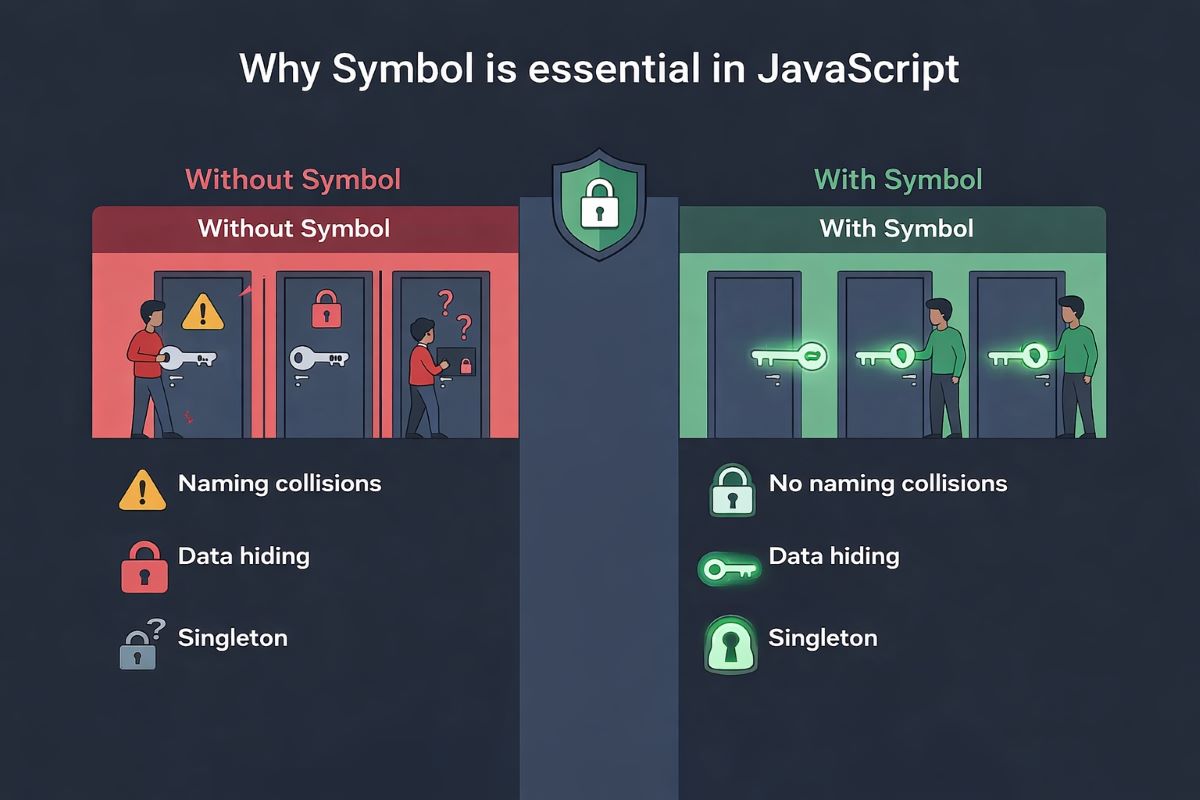

Why use Symbol in JavaScript is a question most developers don’t think about—until they run into it in real-world code. You’ve seen it before — a bug that shouldn’t exist, a property getting overwritten somewhere deep in a third-party library, or two modules quietly clashing over the same key name. You fix it, move on, and two weeks later it’s back in a different shape. Sound familiar?
Most developers never stop to ask why these collisions keep happening — or whether JavaScript already has a built-in answer sitting right under their nose. That answer is Symbol, and understanding why use Symbol in JavaScript is one of those rare moments where a language feature genuinely changes how you think about writing clean, collision-free code.
Symbol isn’t just another primitive. It’s a design decision — one that unlocks real solutions for data hiding, unique identifiers, and meta-programming pattern that string-based keys simply can’t handle reliably.
The greatest strength of JavaScript Symbol lies in its uniqueness. Every Symbol is completely distinct from all others — and that’s exactly what makes it so valuable in advanced development. It’s also where we find a clear, practical answer to a question developers run into more than they expect.
In this article, we’ll break down exactly where Symbol fits, why it matters, and how production-level developers are already using it to write more predictable, scalable JavaScript. Let’s dig deeper.
Using Symbols to Prevent Naming Collisions
When you need truly unique IDs, Symbol has a real edge. Using it as an identifier guarantees collision-free values — it’s not just a concept, it’s the whole point of the primitive. And honestly, why use Symbol in JavaScript at all? This is one of the most direct answers you’ll get. This makes Symbol in JavaScript especially useful when working with:
- Internal logic
- Configuration keys
- Database-related internal IDs
In these scenarios, JS Symbol gives you a safe, reliable approach that string-based keys simply can’t match.
Let’s look at a real-world example.
Say we want to build a simple coin toss system. We need exactly two values — heads and tails — and they must stay absolutely unique. They should never conflict with each other, not even by accident.
Symbol is the ideal solution here. Even if two Symbols share the same description of symbols, they’re still guaranteed to be different values — that’s the core function of Symbol at work:
// Even though the descriptions are the same, the values are guaranteed to be unique
const HEAD = Symbol('side');
const TAIL = Symbol('side');

// Simulates a coin toss using unique Symbols
function tossCoin() {
  const isHead = Math.random() < 0.5;
  return isHead ? HEAD : TAIL;
}

const result = tossCoin();

if (result === HEAD) {
  console.log("Result: HEAD");
} else {
  console.log("Result: TAIL");
}

// --- Proof of Reliability ---
console.log(HEAD === TAIL);           // false → They never clash
console.log(HEAD === Symbol('side')); // false → Every Symbol is one-of-a-kind
This is also which of the following is an example of a Symbol used practically in real code — and it’s why Symbol works so naturally for enum-like structures in JavaScript. Since every Symbol for unique value is guaranteed by design, it’s a perfect fit — no extra enforcement needed. This is a clean, working JS Symbol enum approach without any additional boilerplate.
Why Use Symbol in JavaScript for Data Hiding and Privacy
Another powerful use of Symbol data type in JavaScript is data hiding. You can use it to make certain object properties semi-private — not invisible, but out of the way.
This helps you build cleaner internal architecture and better data abstraction. Symbol-based properties are skipped by the most common iteration methods:
- for…of
- Object.keys()
- JSON.stringify()
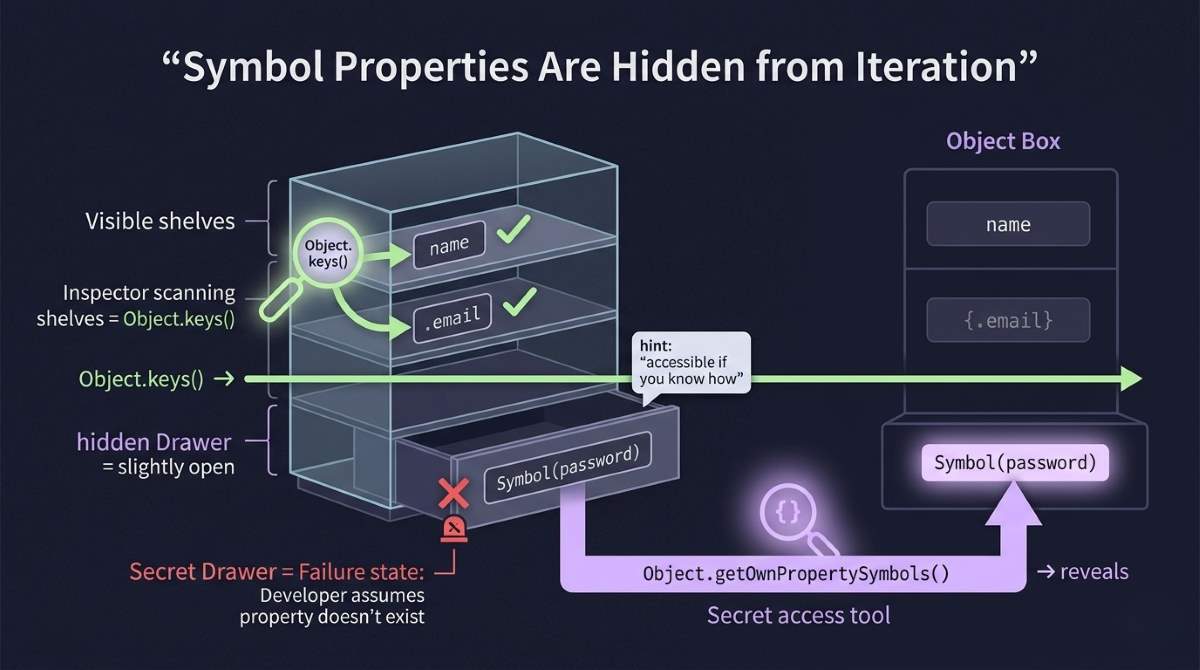
That alone significantly reduces the risk of accidental access or overwriting — which is a bigger deal than it sounds in large codebases. This is one of the strongest JavaScript Symbol use cases you’ll encounter in production-level work.
But here’s the important caveat: this is not true security. Symbol-keyed properties are hidden from normal enumeration, but they’re still accessible via JavaScript’s reflection APIs. Don’t treat them as secrets.
Challenge: Create an object where:
- There’s a public name property
- There’s a “private” password stored under a Symbol key
- The password doesn’t show up in Object.keys()
- But it’s accessible through a special method
Solution:
const _password = Symbol('password');

const user = {

name: 'Rafa',

[_password]: 'secret3411',

getPassword(key) {

return key === _password ? this[key] : 'Access Denied';

}

};
Even though the Symbol object key is hidden from Object.keys(), it can still be retrieved with Object.getOwnPropertySymbols(). That’s the honest tradeoff — controlled hiding, not true privacy.
Still, for values you don’t want users accidentally touching — internal flags, configuration values, framework-level state — Symbol gives you a clean and practical encapsulation tool. It’s especially useful in API design, scalable application architecture, and internal state management. If you’re still asking how to use Symbol in JavaScript for real-world privacy patterns, this is exactly the kind of symbol usage to study closely.
Using Symbol.for for the Singleton Pattern
Singleton is one of the most widely used design patterns out there. The goal is simple: create only one instance of a class or module, then share that single instance across your entire application.
In JavaScript, Singleton gets even more robust when you pair it with Symbol. The uniqueness of Symbol ensures that instance-related keys can never be accidentally overwritten — which is one of the most common ways Singleton implementations quietly break.
Symbol.for() is the key piece here. It acts as a JavaScript global Symbol registry, letting you safely reuse the same Symbol across different parts of your app — and it’s one of the most underappreciated patterns in the symbol in programming world.
Here’s a common scenario:
In a large JavaScript application, multiple modules often need access to the same configuration object. If each module calls new Config() on its own, you end up with multiple instances — wasted memory, inconsistent updates, and hard-to-track state bugs.
The real challenge is guaranteeing a true cross-module Singleton. And once you understand why use Symbol in JavaScript for patterns like this, the answer becomes obvious — no other primitive gives you this level of collision-proof, globally consistent key management.
Get Tareq's engineering logs in your inbox
Join CodeDeed for free for the latest in dev and AI automation.
You’ll understand how Symbols work in JavaScript much better if you read this article—it’s extremely helpful. Solution: Symbol.for() creates a globally unique key accessible from any module using the same reference. By storing the instance on globalThis and using the ??= operator, the instance is only ever created once:
const KEY = Symbol.for('app.config');

class Config {

static getInstance() {

return globalThis[KEY] ??= new this();

}

}

const config1 = Config.getInstance();

const config2 = Config.getInstance();

console.log(config1 === config2); // true
Use Symbol.for() with globalThis and ??= to get a single, consistent, memory-efficient config instance across all your modules — no coordination required.
This approach eliminates property collision risk, keeps memory usage tight, and preserves consistent state across your whole application. Symbol’s immutability and guaranteed uniqueness make it an ideal foundation for the Singleton pattern. This is also a great JavaScript Symbol performance win — one instance, shared everywhere, zero duplication.
Symbol.iterator and Meta-Programming
Symbols like Symbol.iterator let you control how objects behave in iteration, while well-known Symbols open the door to powerful meta-programming patterns in JavaScript.
Making Objects Iterable with Symbol.iterator
Symbol.iterator is one of JavaScript’s built-in well-known Symbols — it’s baked right into the language engine. Its job is simple: make an object iterable. Understanding what is Symbol in JavaScript at this level is where things really start clicking.
Once you define obj[Symbol.iterator], that object works with for…of and any other iteration mechanism that expects an iterable.
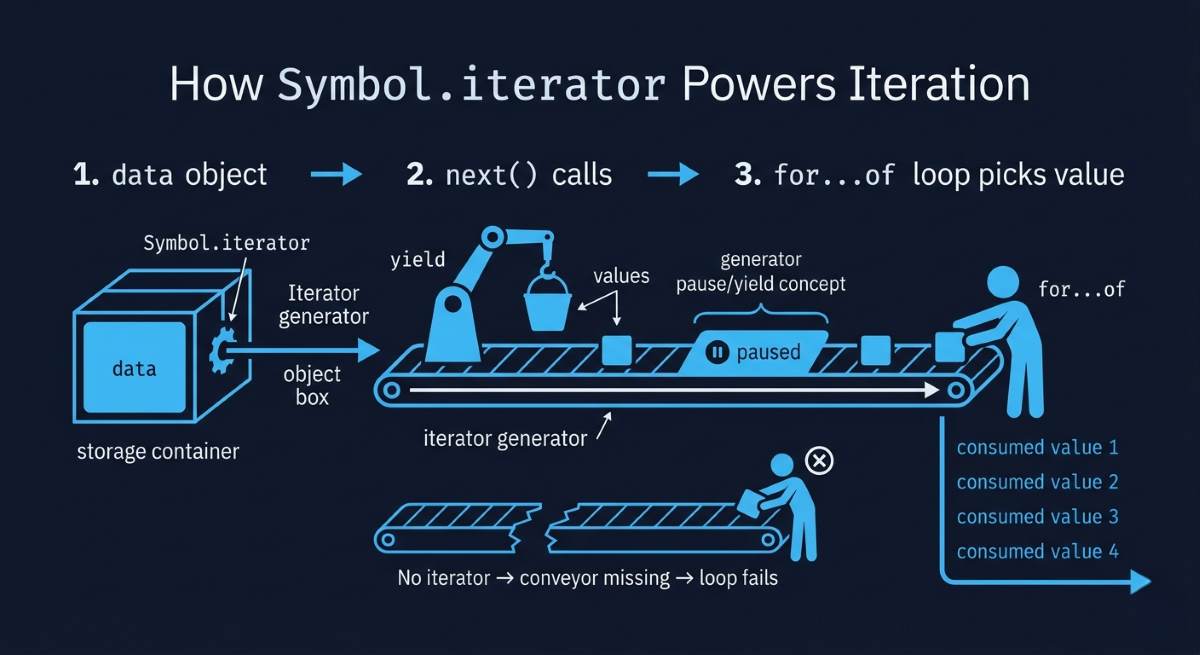
For example, to make a plain object like { a: 10, b: 20 } work with for…of, you implement Symbol.iterator yourself. Here’s a clean way to do it using a generator — a solid JavaScript Symbol iterator example to keep in your toolkit:
const myIterable = {

data: [1, 2, 3],

// The '*' creates a Generator that automatically returns an Iterator

*[Symbol.iterator]() {

for (let item of this.data) {

yield item; // Sends values one by one and pauses in between

}

}

};

for (const val of myIterable) {

console.log(val); // 1, 2, 3

}
Meta-Programming with Well-Known Symbols
Symbol is one of JavaScript’s most powerful tools for meta-programming — the ability to customize how your objects behave with built-in language operations at runtime.
In large-scale applications, Symbol is particularly useful for:
- Property hiding
- Custom iteration
- Dynamic behavior control
Think of it this way: meta-programming means using code to control how other code behaves. Well-known Symbols are the hooks JavaScript gives you to tap into engine-level logic from your own code — and once you understand what is Symbol type in JavaScript at this depth, you start seeing opportunities everywhere.
Here’s how the major ones map to language features:
| Symbol | What It Controls |
| Symbol.toPrimitive | Object → Primitive conversion |
| Symbol.iterator | for…of loop behavior |
| Symbol.toStringTag | Object.prototype.toString output |
| Symbol.hasInstance | instanceof operator |
| Symbol.match | String.match() behavior |
Real-World Example: Symbol.toPrimitive
You’ve already seen how “JavaScript automatically converts objects to primitive values when necessary.” It happens quietly under the hood. That’s exactly where why use Symbol in JavaScript starts to make sense — with Symbol.toPrimitive, you take control instead of relying on default behavior. Here’s a practical example that shows you just how much control these hooks give you. We’ll build a custom logger that behaves differently depending on the context it’s used in — a real JavaScript Symbol to primitive pattern in action:
class Logger {

constructor(context) {

this.context = context;

this.logCount = 0;

}

// In a template string → show context label

// In math → return log count

// Default → full info

[Symbol.toPrimitive](hint) {

if (hint === 'string') {

return `[${this.context}]`;

}

if (hint === 'number') {

return this.logCount;

}

return `Logger(${this.context}): ${this.logCount} logs`;

}

log(msg) {

this.logCount++;

console.log(`${this}`, msg); // triggers toPrimitive with 'string' hint

}

}

const appLogger = new Logger('App');

const dbLogger = new Logger('Database');

appLogger.log('Started');

// Output: [App] Started

console.log(`Total logs: ${appLogger + dbLogger}`);

// Output: Total logs: 2

// (Uses 'number' hint, adds both log counts)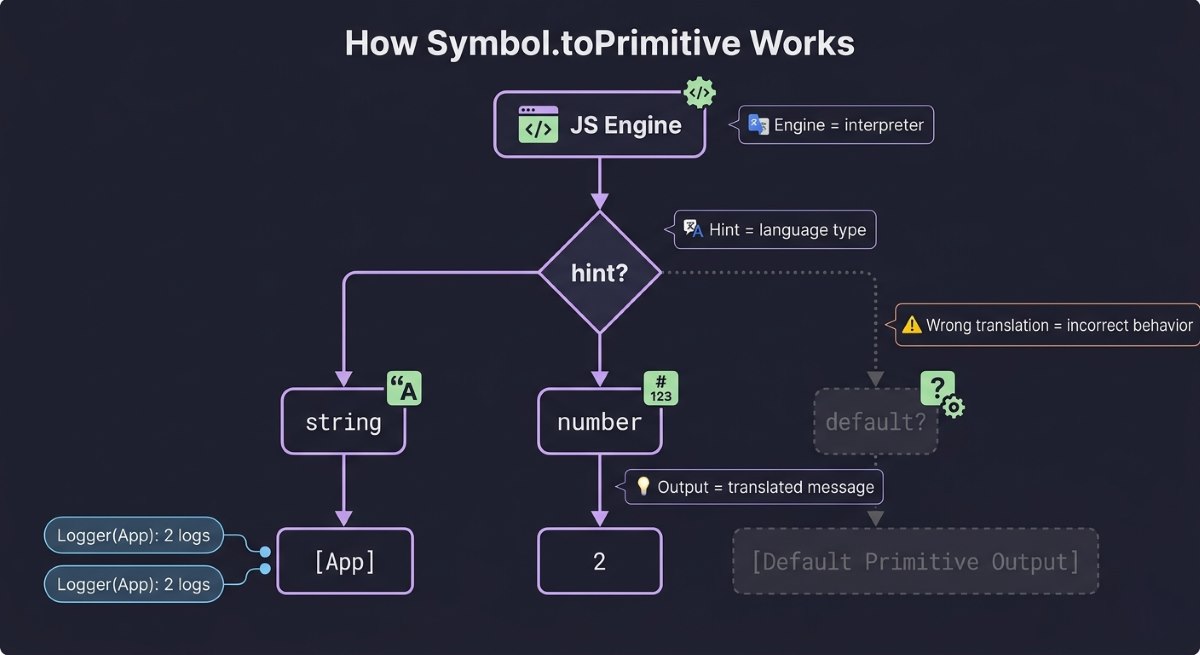
You’re explicitly telling the JavaScript engine which rules to follow when it needs to convert your object into a string or a number. That’s the real power of Symbol.toPrimitive — and what does the Symbol primitive do in JavaScript is answered perfectly right here. This is exactly the kind of thing you’d actually run into building a real logging or monitoring system.
Roundup
By now, you’re not just familiar with Symbol — you actually get it. You’ve seen how it prevents naming collisions, enables cleaner data hiding, powers the Singleton pattern, and hooks directly into JavaScript’s engine-level behavior through well-known Symbols. That’s not surface-level knowledge. That’s the kind of understanding that quietly separates confident developers from the ones still guessing.
Here’s the honest truth: most developers work with JavaScript for years without ever stopping to ask why use Symbol in JavaScript — or what they’re missing by skipping it. Now you have that answer, and it changes how you’ll look at object design, API architecture, and internal state management going forward.
Anyway, we have a complete guideline on how to approach JavaScript Symbol explained at a professional level, including exactly how to learn it. If you follow it, I believe you’ll become a highly advanced and professional JavaScript developer.
The best code isn’t always the most complex — it’s the most intentional. Symbol is proof of that.
If this gave you a clearer picture of how JavaScript really works under the hood, there’s a lot more where that came from. Stick around — the next one might just shift your perspective again.