

JavaScript Symbol was introduced to solve a very real problem in modern applications. In JavaScript, object properties are usually identified using string keys. That works well at first. But as applications grow, different parts of the codebase can unknowingly use the same property name.
To address this issue, JavaScript introduced the Symbol primitive. A Symbol creates a completely unique property identifier within an object. That built-in uniqueness prevents name collisions and protects your data from accidental overwrites.
Formally, JavaScript Symbol is a primitive data type introduced in ES6 that represents a guaranteed-unique property key.
JavaScript Symbol is one of those features most developers hear about but never really dig into— until they hit a wall. You add a property to an object thinking it’s safe, only to find out later that something quietly overwrote it. No error. No warning. Just weird behavior hiding somewhere deep in your codebase. In larger applications, especially when you’re working with libraries or shared objects—these naming collisions happen way more than you’d think.
I’ve spent years building production JavaScript systems, working with APIs, and integrating third-party code. I can’t tell you how many times I’ve seen tiny property conflicts snowball into painful debugging sessions and maintenance nightmares. Symbols give you a language-level guarantee of uniqueness. They make your code safer, more predictable, and honestly just easier to understand.
So let’s get into how Symbols actually work—and why you should care.
What Is the JavaScript Symbol Data Type?
The symbol primitive type represents a unique and immutable value that showed up in ES6 (2015). Here’s the key thing: every symbol carries a unique identity. Every single time you create one, it’s completely unique— even if you give it the same description as another symbol.
Think of it like passport numbers. Two passports might look similar in format, but they belong to completely different people. Symbols work exactly the same way. Each one represents a unique identity, regardless of whether their descriptions match.
Why does this matter? JavaScript Symbols are primarily used to hide data or create private object properties and to prevent property name collisions. It’s a powerful tool that makes your code more secure and predictable.
Why Use Symbol in JavaScript to Prevent Property Collisions?
The primary reason to use the Symbol constructor is to avoid property naming collisions. Here’s a practical scenario.
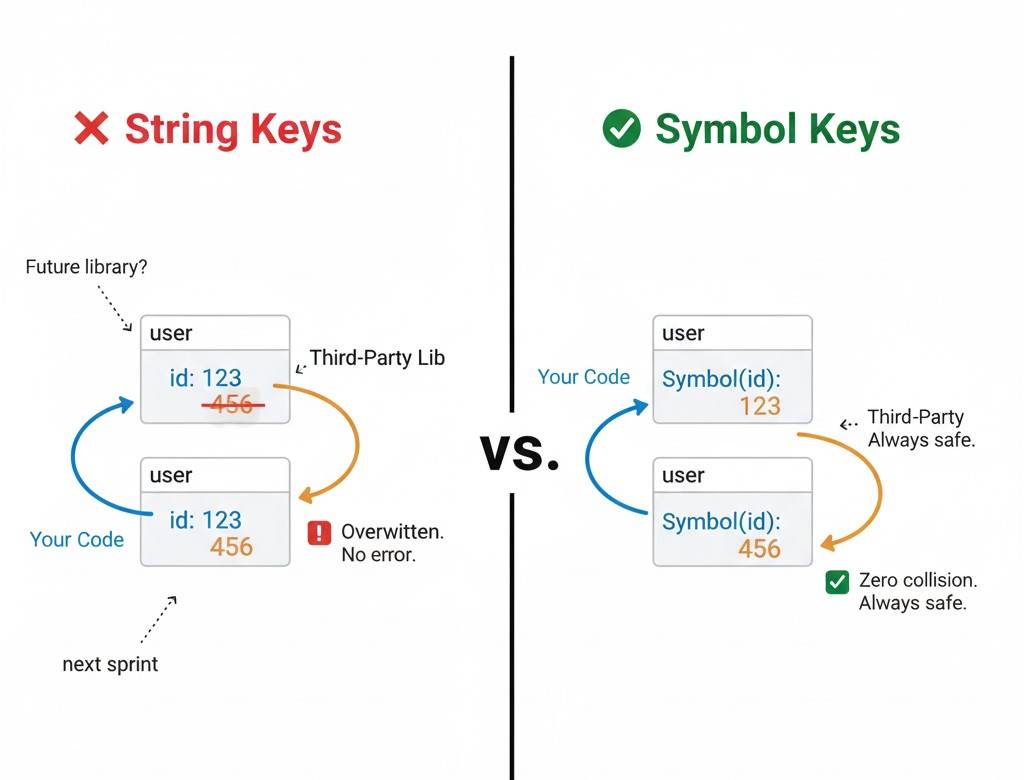
Say you have a user object with an id property. Then you integrate a third-party library that also tries to add an id property to the same object. What happens? Your original value gets overwritten. Symbols solve this elegantly. Every JavaScript symbol creates a guaranteed unique identifier, so there’s zero chance of collision:
const id = Symbol("id");

user[id] = 1; // collision impossible
This way, your property stays completely safe and unique.
While serving as a Senior Developer for an e-commerce platform with over 50,000 Monthly Active Users (MAU), I encountered this specific naming collision issue. We were integrating a third-party analytics library that injected a trackingId property into the global user object.
Problem was, our own code also used trackingId. After deploying to production, the analytics system completely broke because our value was overwriting theirs.
At first, we considered renaming it to something like _trackingId or internal TrackingId. But that was just a band-aid—future collisions were still possible. Once we switched to symbols, the problem was solved permanently.
Now my rule is simple: if a property needs to be shared with third-party code or future modules, and its uniqueness matters, I don’t even consider anything else. This is the most practical example I’ve learned so far.
JavaScript Symbol Syntax and Constructor
Creating a JavaScript symbol is unique because it doesn’t follow the traditional object instantiation rules you’re used to. Instead of using a standard constructor, you use a specialized factory function that guarantees an immutable and one-of-a-kind identifier every single time.
How to Write Symbol in JS
To create a symbol in JavaScript, you use the Symbol() function. It works like a factory function. One important thing: you can never call JavaScript Symbol with the new keyword. This represents a classic use case.
const mySymbol = Symbol();

const userId = Symbol('userId');
Here, 'userId' is just a description that helps during debugging— it’s not the actual value of the symbol. Let me give you a real-world example. Say you’re building a library that works with user objects. You want to store an internal ID that users can’t accidentally overwrite. A symbol is the perfect solution.
Even if the descriptions are the same, every JavaScript symbol is completely different. Two symbols are never equal: Symbol("id") === Symbol("id"); // false
What is symbol constructor in JavaScript?
When we say “symbol constructor,” we’re really just talking about the Symbol() function itself. It looks like a constructor, but technically it’s not. That’s why calling new Symbol() throws an error: TypeError: Symbol is not a constructor.
Why? Because Symbol is a primitive type, and in JavaScript, you can’t create primitive types with the new keyword. JavaScript intentionally blocks this to keep things consistent. When you call Symbol(), it returns a primitive symbol value—not an object. If you check typeof symbol, you’ll get “symbol”.
How to Use Symbol in Object in JS: Practical Examples
Using symbols as object properties is an advanced but extremely powerful technique. When should you use it? Most of the time, regular string properties work fine. But when you need internal or meta properties that should stay separate from normal property access, JS symbol is perfect.
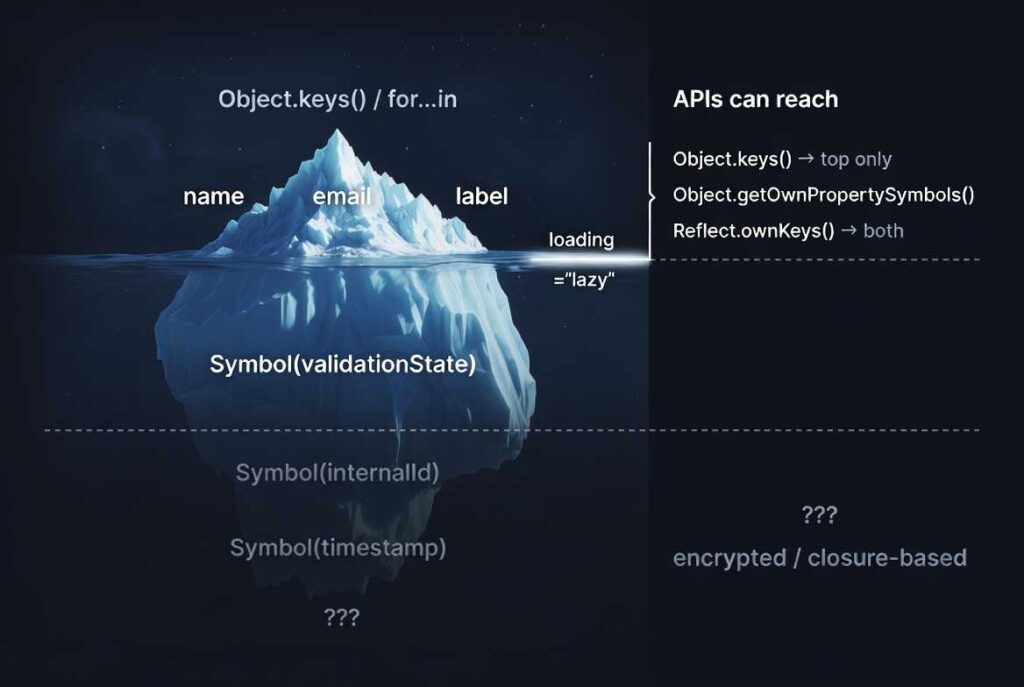
Here’s a realistic example: say you’re building a form validation library. Each form field has validation rules and error messages (public data). But internally, you also need to track validation state, whether it’s been touched, and so on. You can store these internal states as symbol properties. Here is a quick example:
const _validationState = Symbol('validationState');

const field = {

label: 'Email',

[_validationState]: { touched: false, valid: null }

};
This approach keeps your library’s internal data protected and outside the reach of ordinary iteration. This way, your internal implementation details stay separate from the public API.
Important reminder: A JavaScript symbol doesn’t provide absolute privacy. Anyone can access symbol properties using Object.getOwnPropertySymbols(). So symbols offer “soft privacy”— they hide things by convention, not through actual security.
Accessing and Inspecting Symbol Properties
Symbol properties aren’t accessible using standard methods. Object.keys() or for…in loops ignore symbol properties. That’s why JavaScript provides a special method: Object.getOwnPropertySymbols(). This method returns an array of all symbol properties of an object:
const id = Symbol('id');

const user = { name: 'Alice', [id]: 101 };

Object.keys(user); // ['name']

Object.getOwnPropertySymbols(user); // [Symbol(id)]
A key question is—when do you need this? During debugging, while building object inspection tools, or whenever you need to work programmatically with all properties. If you want both string and symbol properties at once, use Reflect.ownKeys(): Reflect.ownKeys(user); // ['name', Symbol(id)]
It’s practically the gold standard for deep object introspection and metadata inspection. Remember: While we discuss privacy, it’s really more about soft privacy than true encapsulation. Anyone can access them using Object.getOwnPropertySymbols(). For truly sensitive data, use proper encryption or closure-based privacy mechanisms.
Main Characteristics of JavaScript Symbols
JavaScript Symbol have some fundamental characteristics that set them apart from other data types. Understanding these traits really clarifies what they’re good for.
Below is a concise summary of the core characteristics that define how JavaScript Symbols behave in real-world applications.
Get Tareq's engineering logs in your inbox
Join CodeDeed for free for the latest in dev and AI automation.
| Characteristic | Core Idea | Developer Benefit |
|---|---|---|
| Uniqueness | Always unique | No collisions |
| Immutability | Cannot change | Stable identifiers |
| Non-Enumerable | Hidden from loops | Clean API |
| JSON Omitted | Not serialized | Safe serialization |
| Soft Privacy | Reflection-accessible | Controlled visibility |
JavaScript Symbol Uniqueness
The most important characteristic is uniqueness. Every symbol is always unique— that’s its core nature. Think of each JavaScript symbol like a fingerprint. No two people have the same fingerprint. Similarly, no two symbols are ever identical, even if their descriptions match.
This uniqueness is especially useful when you need guaranteed unique identifiers. In a large app, different modules might define various properties. But if you use symbols, there’s no risk of naming collisions.
Immutable Symbol: Security and Stability
Symbols are immutable. Once created, they can’t be changed in any way. Since Symbol is a primitive type, immutability comes naturally.
Why does this matter? This immutability ensures that your identifier won’t be changed accidentally or intentionally. This is crucial for maintaining data integrity and security.
For example, if you create a configuration key using a symbol, no one can accidentally or deliberately change that key later. This improves the stability of your app.
Non-Enumerable Symbol: Hiding Object Metadata
JavaScript symbol properties are non-enumerable by default. This means that even if you apply standard iteration methods like the for...in loop or Object.keys(), they won’t be visible.
Here’s a practical example: say you want to store some public data (name, email) and some internal metadata (timestamp, internal ID) inside a user object. If you use symbol properties, only the public data will appear in normal loops—the internal data or metadata stays hidden.
This creates a natural separation between public and “pseudo-private” data. It’s not true privacy, but it does protect against accidental exposure.
This behavior also extends to data serialization. The JSON standard does not define a Symbol type; consequently, JSON.stringify() omits Symbol-keyed properties during serialization to maintain JSON compatibility. If you try to stringify an object containing symbols, those properties will simply vanish from the resulting string.
Symbol.for() and the Global Symbol Registry
While standard Symbols are strictly unique to their local scope, there are times when you need to share a JavaScript symbol across different parts of your application or even across different realms.
To handle this, JavaScript provides a Global Symbol Registry that allows you to create and retrieve shared symbols by using a specific key.
JavaScript Global Symbol Registry and Symbol.for Explained
So far, we’ve learned that every symbol is unique. But sometimes, we need to share the same symbol across different parts of an app. To handle this, JavaScript provides the global symbol registry and the Symbol.for() method.
What’s the difference? A normal Symbol() always creates a new unique symbol. But Symbol.for(key) first checks the global registry. If a symbol for that key already exists, it returns the existing symbol. Otherwise, if it doesn’t exist, it creates a new one and saves it in the registry for future use.
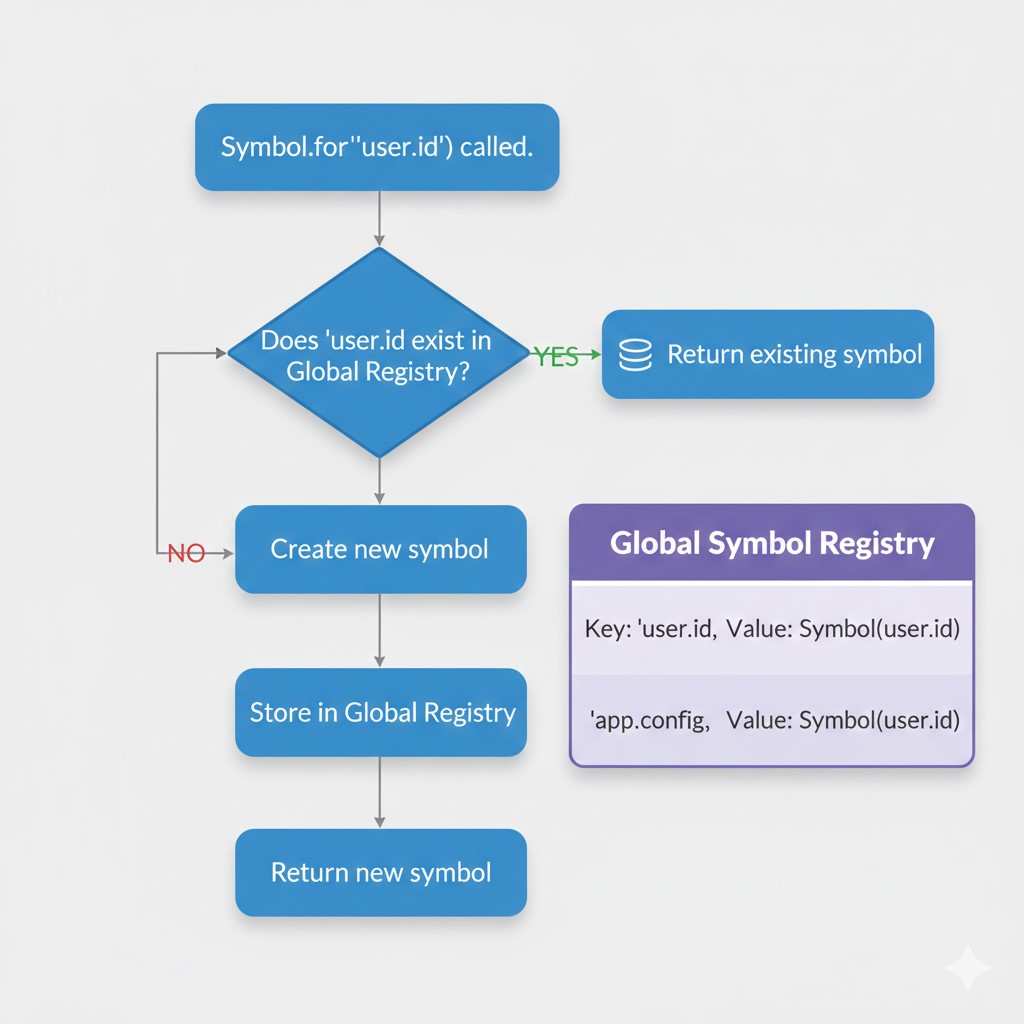
let userId1 = Symbol.for('user.id');

let userId2 = Symbol.for('user.id');

console.log(userId1 === userId2); // true
Real-world use case: say you have a large app where multiple modules use the same logging system. Instead of creating separate symbols in each module, using Symbol.for('app.logger') ensures all modules share the same symbol.
Symbol.keyFor(): Retrieving Global Symbol Keys
With Symbol.keyFor(), you can retrieve the original key string of a global symbol. Below is an example:
let globalSym = Symbol.for('app.config');

console.log(Symbol.keyFor(globalSym)); // "app.config"
Important note: this only works for global symbols. For local symbols, it returns undefined.
Symbol.for() Use Cases
Use Symbol.for() when:
- You need to reference the same symbol across multiple modules or files
- You need to share a common identifier with third-party libraries. This provides a highly efficient approach.
- You need cross-realm communication (like between iframes or worker threads)
Best practice: since the global registry is accessible to everyone, be careful with key naming. Use descriptive, namespaced keys like ‘myApp.feature.identifier’.
In one of my microservices projects, maintaining shared event constants across different services was a nightmare. Initially, we created separate symbols in each service. But cross-service communication failed because Symbol(‘USER_LOGGED_IN’) produced a different value every time.
Symbol.for() was a game-changer. By using Symbol.for(‘app.events.USER_LOGGED_IN’), all services started referencing the same symbol.
However, I made one critical mistake: at first, I used a simple key like Symbol.for(‘loggedIn’). Later, another team used the same key for their feature, and we had a collision—exactly what symbols are supposed to prevent! Now my personal rule is: whenever I use the global registry, I always write fully namespaced keys like myApp.domain.specificEvent. It might feel like extra boilerplate, but it protects your codebase from future property collisions.
Round Up
JavaScript Symbol probably feel a lot less mysterious now. I used to think they were just a weird edge case until I actually needed to prevent property collisions in a library. Then everything clicked.
What really changed for me wasn’t just learning the syntax—it was understanding why JavaScript works this way, especially when your code needs to scale or play nice with other libraries.
If you want to understand how Symbol fit into JavaScript’s broader object architecture and why they were introduced at the language-design level, read the full JavaScript Symbol explained guide.
I’ve found that using JavaScript symbols thoughtfully strengthens your architecture without making code harder to read. It’s one of those things that shows you really get JavaScript at a deeper level. If this helped clarify symbols for you, I’ve got more deep dives like this—each one aimed at sharpening how you think about the language, not just how you use it.
What is a JavaScript symbol?
A JavaScript Symbol is immutable and always unique. It is a primitive data type that was introduced in ES6 to prevent accidental property overwrites and enable safer object metadata management.
How do you create and use a symbol variable in JavaScript correctly?
We can use Symbols in two ways: the standard way and with a description. For example, const sym = Symbol() and const sym1 = Symbol('Any description'). Using a description with a Symbol is considered best practice.
What is the JavaScript symbol constructor and why new Symbol() fails runtime?
Actually, Symbol() is not a constructor function; it is a factory function. Calling new Symbol() will directly throw an error. While you can create objects using the new keyword, a Symbol is a primitive type, and primitives cannot be created with new.
. What is the JavaScript global Symbol registry?
The JavaScript Global Symbol Registry is a global lookup table that stores Symbols using string keys, allowing the same Symbol to be shared across different parts of an application.
What is a non enumerable in javaScript?
Symbols are primarily used for object properties. Generally, Symbol-based object properties are not visible during normal iteration. This applies to operations such as for...in loops, Object.keys(), Object.values(), Object.assign(), and the spread operator ({...obj}).
Why does JSON.stringify ignore Symbol properties?
Because Symbols are not part of the JSON specification, and JavaScript strictly follows that spec when serializing data.