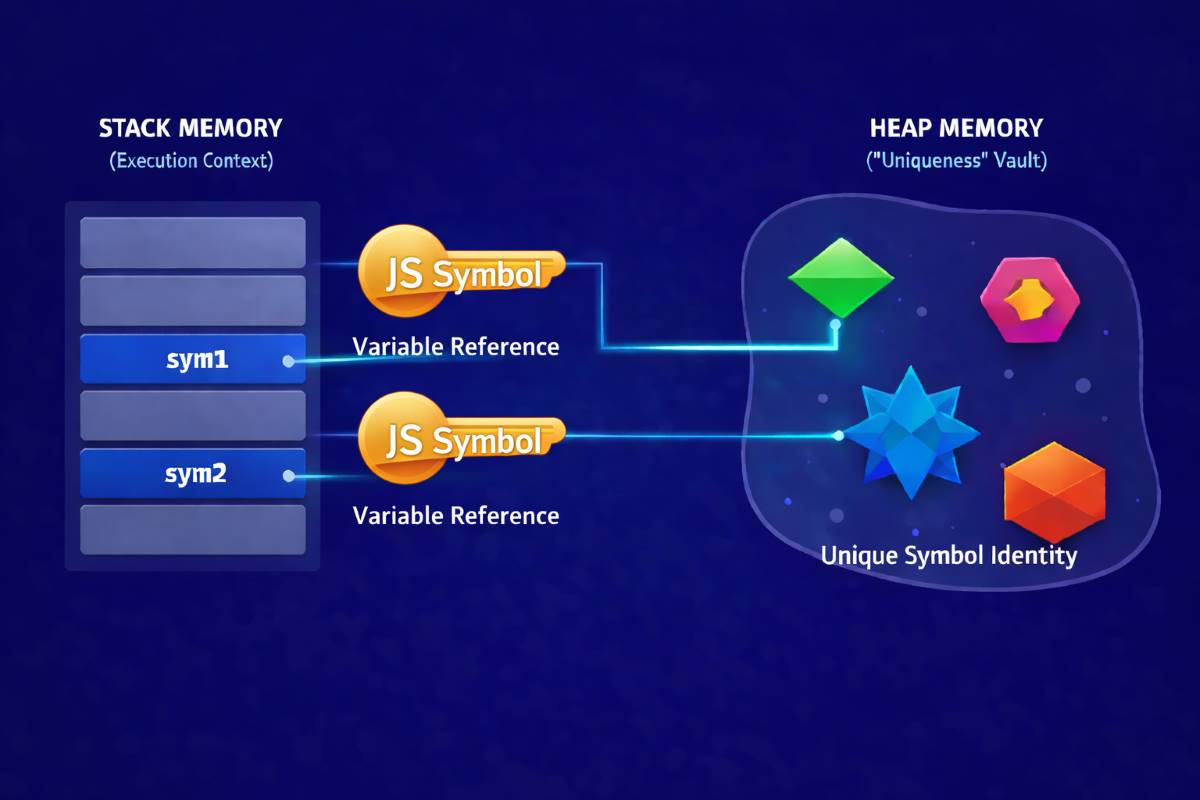

JavaScript symbol data type is a unique primitive—immutable by design—mainly used to create unique identifiers for objects.
The real power of symbols? They eliminate property name collisions. When you use a JavaScript Symbol object key, you’re guaranteed that your data won’t get accidentally overwritten. One identifier will never match another, even if they look similar.
In modern JavaScript applications—especially when working with large codebases or third-party libraries—this level of uniqueness becomes essential. It keeps your internal properties safe, predictable, and completely isolated.
Real-Life Analogy of the JavaScript Symbol Data Type
Think of a Symbol like your National ID number. Two people might share the same name, but their ID numbers are always different. That’s exactly how symbols work—they’re unique references that can’t be duplicated.
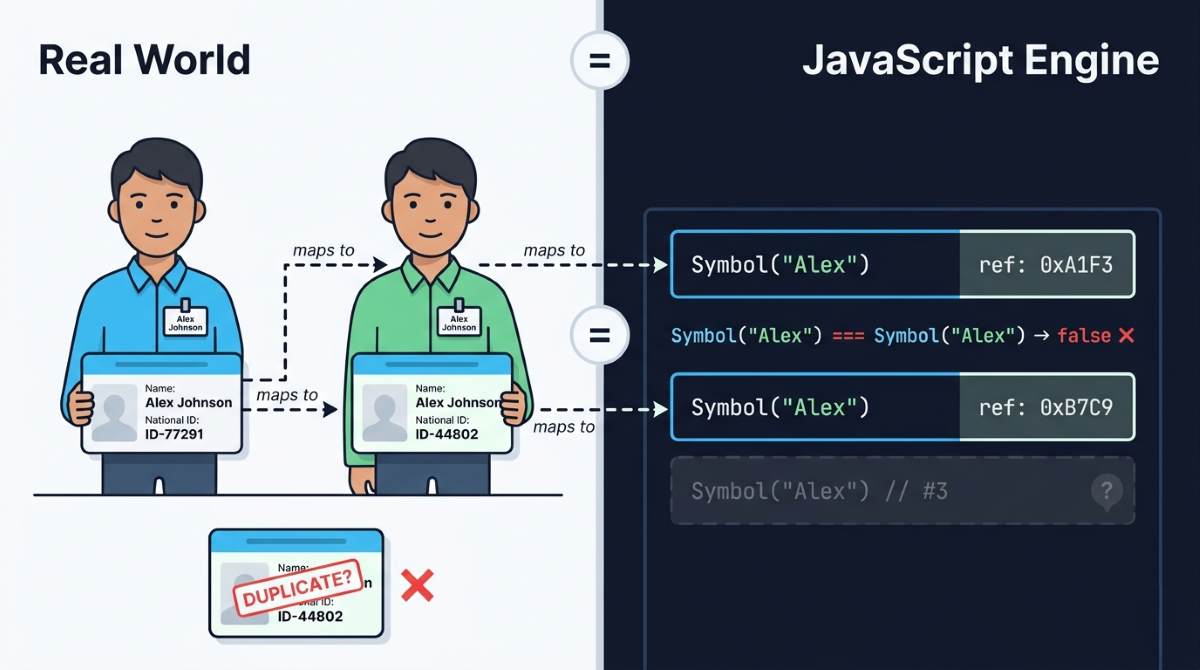
To get the full picture, it’s helpful to understand how JavaScript Symbol works at a foundational level, especially its core internal mechanism and why uniqueness is guaranteed. Using a Symbol as a unique identifier in your code works much like a real-world ID. Just like the government uses your ID to uniquely identify you, the JavaScript engine uses the javascript symbol data type to ensure properties stay distinct. This keeps your code accurate and your data secure.
Behind the scenes, the engine creates an internal identifier for each symbol in JavaScript and stores it in memory as a specific reference. You can’t directly access or modify this reference from the outside—it’s locked down by design.
The mechanics of the javascript symbol data type break down into two main parts:
Unique Instance
Every time you call Symbol(), JavaScript creates a new, independent address in memory. Even if you use the same description twice, the symbols won’t be equal:
Symbol(“abc”) === Symbol(“abc”) // always false
This is completely intentional. Even though the description of the js symbol matches, their memory references are different. This prevents property conflicts across different parts of your codebase.
Global Registry
When you use Symbol.for(key), the runtime checks a global registry first. If a symbol in js with that key already exists, it returns the existing one instead of creating a new reference:
Symbol.for(“id”) === Symbol.for(“id”) // true
This ensures system-wide consistency—you can access the same Symbol from different places using the same key.
Real-World Use Case of the JavaScript Symbol Data Type
Problem: Third-party libraries can overwrite your properties
const user = {

name: "Rafa",

id: 123  // your property

}
Some library does this internally:
user.id = "LIB_001"; // Oops! Your data just got clobbered
The javascript symbol data type solves this problem elegantly:
const myId = Symbol('id');
user[myId] = 123; // now collision-proof
This property:
- Won’t show up in loops
- Can’t be accidentally overwritten
- Stays internally safe
JavaScript Symbol Constructor as a Factory Function
To understand this design choice, let’s look at how the JavaScript Symbol constructor actually works.
Why Symbol cannot be called with new
In JavaScript, we typically use new to create objects—think new Object() or new Array(). But the javascript symbol data type breaks this pattern entirely.
Symbol isn’t a regular class or constructor—it’s a factory function. When you call Symbol(), it directly returns a primitive value. There’s no prototype chain or object wrapper needed. If you try new Symbol(), you’ll get an error:
Symbol("id"); // valid
new Symbol("id"); // TypeError
This design ensures three things:
- Fast execution: No unnecessary object creation overhead
- Low memory footprint: No wrapper objects eating up RAM
- Predictable behavior: Symbols always work the same way
JavaScript Symbol vs String
They look similar, but they’re fundamentally different. In my early programming journey, I used to think of these two as the same. The new keyword difference really drove home how distinct they actually are:
new Symbol('desc'); // TypeError: Symbol is not a constructor
new String('desc'); // Creates a String object
Why the restriction? The javascript symbol data type isn’t a constructor because every Symbol must be internally unique. If you could use new, symbols with identical descriptions might not remain separate instances—which would break Symbol’s core guarantee of uniqueness.
Bottom line: Symbol is for unique identity, String is for text data. They may look similar on the surface, but they serve completely different purposes. However, I’ve seen frequent controversies in programming communities regarding ‘Symbol vs String’ when it comes to symbol in programming.
So, when you define something using the javascript symbol data type for a value, it may seem like a string, but it actually holds a completely different identity in memory.
JavaScript Symbol Data Type vs Other Primitives
| Feature | String | Number | Symbol |
|---|---|---|---|
| Unique? | No | No | Yes |
| Enumerable? | Yes | Yes | No (by default) |
| Mutable? | No | No | No |
| As key? | Yes | Auto convert | Yes (hidden) |
How the JavaScript Symbol Data Type Works in Heap and Stack Memory
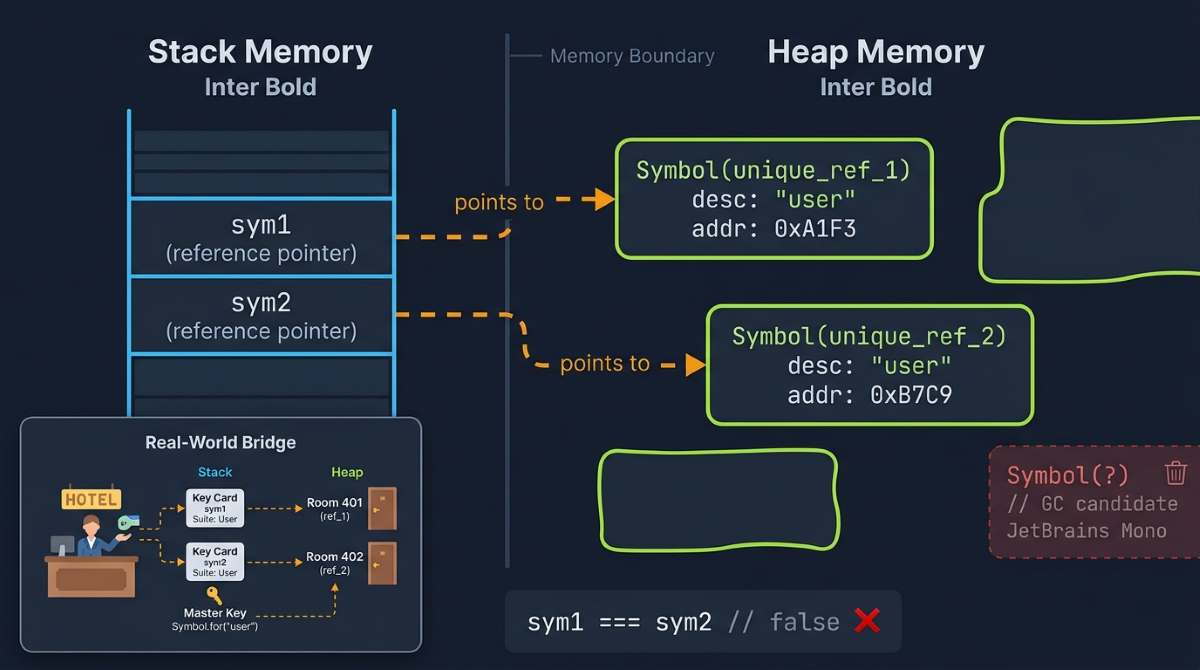
To understand how javascript symbols are stored, you need to grasp JavaScript’s memory model. The javascript symbol data type works through the interplay between stack and heap memory.
Heap Memory and Symbol References
The actual symbol data—its description and unique identity—lives in heap memory. The JavaScript engine uses heap memory for large, dynamic data. Whether or not your js symbol has a description, its unique reference is stored there.
Even though Symbol is a primitive type, it behaves like an object in memory. Each symbol occupies its own distinct space and holds a unique reference. This completely separates it from String or Number.
Stack Memory and JavaScript Symbol Variable
Stack memory holds variable names and references. When you write:
let sym = Symbol("Description");
The symbol variable sym lives in stack memory. However, the stack doesn’t store the actual Symbol itself—it only holds a reference to the value stored in heap memory.
In short:
– Heap → actual Symbol data
Get Tareq's engineering logs in your inbox
Join CodeDeed for free for the latest in dev and AI automation.
– Stack → reference to that data
Visual Memory Diagram
Why Symbols Stay Hidden in Loops
A key detail to remember is that JavaScript Symbol data type is Not Enumerable in for…in Loops which means symbol-based properties stay hidden during normal object iteration.
This behavior is what makes the JavaScript Symbol data type ideal for creating safe, collision-free properties in complex applications. It allows developers to attach internal metadata without affecting loops, serialization, or external data exposure.
In large-scale systems, this ensures cleaner object structures and prevents accidental overrides. That’s why symbols are often used in libraries and frameworks where controlled visibility matters most.
const user = {

name: "Rafa",

id: 123  // your property

}
for (let key in user) {
  console.log(key);  // only 'name' — no Symbol!
}Object.keys(user); // ['name']
JSON.stringify(user); // {"name":"Rafa"} — Symbol vanished!
In all these cases, symbol in javascript properties are invisible. To access them, you need a special method:
Object.getOwnPropertySymbols(user); // [Symbol(id)]
This is the privacy and safety layer of the javascript symbol data type in action.
Symbol Variable Lifecycle and Garbage Collection
To understand how Symbols are managed over time, we need to look at their lifecycle and how garbage collection removes unused references.
When Symbols Get Removed from Memory
A symbol’s lifecycle depends on reference counting. When a stack variable (like sym) gets reassigned, the previous symbol becomes detached:
let sym = Symbol("temp");
sym = null; // Symbol data in heap is now eligible for garbage collection
Once a symbol value has no active references, JavaScript’s garbage collector automatically cleans it up from heap memory. This ensures:
- No memory leaks
- Stable long-running applications
- Optimal performance
By freeing memory at the right time, long-running applications stay stable for extended periods. This efficient management of the javascript symbol data type makes JavaScript more performant overall.
Implementing a Custom JavaScript Symbol Function
To understand how Symbol works under the hood, let’s build our own MySymbol function. Through this javascript symbol tutorial, it’s possible to understand the internal mechanics more clearly.
MySymbol Factory Function Explained
Here’s a mini Symbol engine. The factory function generates a unique symbol id every time it’s called—this serves as the internal reference that keeps each symbol separate:
// Create unique symbol-like key
function MySymbol(desc) {
  return {
    key: `__${desc}_${Math.random()}`, // unique key
  };
}

// Add hidden property
function setHidden(obj, sym, value) {
  Object.defineProperty(obj, sym.key, {
    value,
    enumerable: false, // 👈 hidden in loops
  });
}

// Get hidden value
function getHidden(obj, sym) {
  return obj[sym.key];
}
}


const user = { name: "Rafa" };

const id = MySymbol("id");

setHidden(user, id, 123);

console.log(Object.keys(user)); // ["name"] ✅ hidden
console.log(getHidden(user, id)); // 123
Custom Symbol.for and keyFor Logic
JavaScript’s Symbol.for uses a global registry so the same key always returns the same Symbol reference. This maintains shared identity across your entire application—a core feature of how the javascript symbol data type manages global state.
Here’s how to implement it:
const globalRegistry = Object.create(null);

MySymbol.for = function (key) {
  key = String(key);

  if (!Object.prototype.hasOwnProperty.call(globalRegistry, key)) {
    globalRegistry[key] = MySymbol(key);
  }

  return globalRegistry[key];
};
By normalizing with String(key), we ensure 10 and “10” use the same identity.
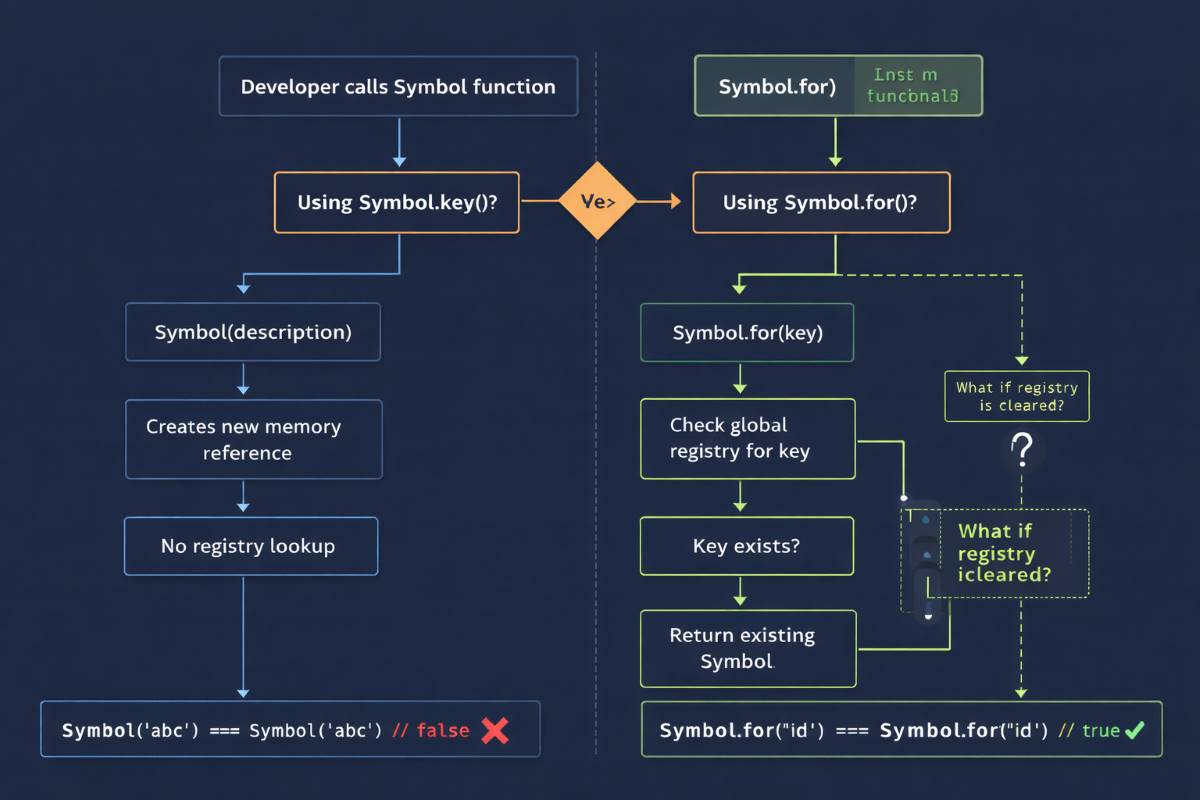
This design guarantees:
- Consistent registry lookup: Data retrieval stays reliable
- Lazy initialization: New references only when needed
- Memory optimization: Efficient resource usage
- System-wide consistency: Global uniqueness through shared identity
MySymbol.keyFor — Reverse Mapping
The MySymbol.keyFor function finds the original global key for a specific symbol reference—essentially reverse mapping:
MySymbol.keyFor = function (symbol) {
for (const key in globalRegistry) {
if (globalRegistry[key] === symbol) {
return key;
}
}
return undefined;
};
Since Symbol.for() always returns the same reference for a given key, this approach is reliable. By scanning the registry, we can identify the original key. This provides:
- Easy identification: Quickly see which key created a symbol
- Registry scanning: Finds the correct data by looping through global storage
- Reliability: Unique references mean no false matches
When you’re working with advanced Symbol techniques, keyFor is invaluable for debugging and javascript symbol metadata management.
If you’re looking for a clear, structured learning path, JavaScript Symbol Explained: 5 Reliable Architecture Guides provides a broader architectural view—breaking down what it is, how it works, why it matters, and how it’s applied in real-world system design, all in one place.
Round Up
The JavaScript Symbol data type isn’t just another primitive—it’s a powerful way to create truly unique, collision-free identifiers in your code.
From preventing accidental property overrides to enabling safer integrations with third-party libraries, symbols give you a level of control that strings simply can’t offer. And once you understand how they work behind the scenes—memory, uniqueness, and global registry—their value becomes even clearer.
If you’re building scalable or complex JavaScript applications, using symbols isn’t optional—it’s a smart design choice.
Frequently Asked Questions About JavaScript Symbol Data Type
What data type is a symbol in JavaScript?
Even if two symbols look the same, they never match. That’s what makes them useful for creating safe, collision-free object keys.
How do symbols work in JavaScript?
Symbol().Even if the description looks identical, each symbol gets its own internal reference in memory. This hidden uniqueness ensures that symbol-based keys never conflict with other properties.
In simple terms, symbols act like invisible, collision-proof identifiers inside your code.
What is the difference between a symbol and a string?
Two strings with the same content are always equal. But symbols never match—even if their descriptions look identical—because each one holds a different internal reference.
In short, strings are for readable data, whereas symbols are for creating collision-free, unique keys in objects.
Why Symbol cannot be called with new?
Using
new would create objects instead, which breaks Symbol’s core purpose of guaranteed uniqueness.Why Symbols Stay Hidden in Loops?
for...in or Object.keys().This keeps them hidden and prevents accidental access or modification.
What is relation between JS Stack and Heap memory?
So, the stack points to the heap—separating fast access from actual data storage.